
Categories
Allure Report helps you track errors (and, optionally any other kind of test results) by dividing them into categories based on the statuses and output messages of the tests.
TIP
Each result belongs to only one category. It can be one of the default categories Allure assigns automatically, or a custom category you define yourself.
On the Categories tab in a test report, the tests are grouped by their category, their error message, and optionally by several other levels of categorization.
Default categories
Allure defines two default error categories, both of which include tests that did not finish successfully:
Custom categories
You can define any number of custom categories. All test results are matched against your custom categories first, in the order you define them. Failed or broken tests that don't match any custom category are assigned to the default categories automatically.
Allure Report 3
In Allure Report 3 you can configure custom categories in the categories field of the runtime configuration file.
The examples below showcase the two main approaches for defining categories, with all available settings included.
We will discuss the differences between these two approaches further down.
import { defineConfig } from "allure";

export default defineConfig({
  name: "Allure Report 3",
  output: "./allure-report",
  historyPath: "./history.jsonl", //required for flaky and status transitions detection
  categories: {
    rules: [
      {
        name: "Critical regressions by layer",
        id: "critical-regressions-by-layer",
        // this section determines what's included into the category
        matchers: {
          statuses: ["failed", "broken"],
          flaky: false,
          labels: { severity: "critical" },
          message: /expected|API/, // accepts regular expressions
          trace: /AssertionError|timeout|unexpected/, // accepts regular expressions
          transitions: ["regressed", "malfunctioned"],
          environments: ["staging", "production"],
        },

        // this section determines how the category is presented
        groupBy: ["layer", "owner", "status"],
        groupByMessage: true,
        groupEnvironments: true,
        expand: true,
        hide: false,
      },
    ],
  },
});import { defineConfig } from "allure";
export default defineConfig({
name: "Allure Report 3",
output: "./allure-report",
historyPath: "./history.jsonl", //required for flaky and status transitions detection
categories: {
rules: [
{
name: "Critical regressions by layer",
id: "critical-regressions-by-layer",
// this section determines what's included into the category
matchers: (data) =>
(data.status === "failed" || data.status === "broken") &&
!data.flaky &&
data.labels.some((l) => l.name === "severity" && l.value === "critical") &&
/expected|API/.test(data.message ?? "") &&
/AssertionError|timeout|unexpected/.test(data.trace ?? "") &&
(data.transition === "regressed" || data.transition === "malfunctioned") &&
(data.environment === "staging" || data.environment === "production"),
// this section determines how the category is presented
groupBy: ["layer", "owner", "status"],
groupByMessage: true,
groupEnvironments: true,
expand: true,
hide: false,
},
],
},
});Both of these examples create a custom category that looks like this:
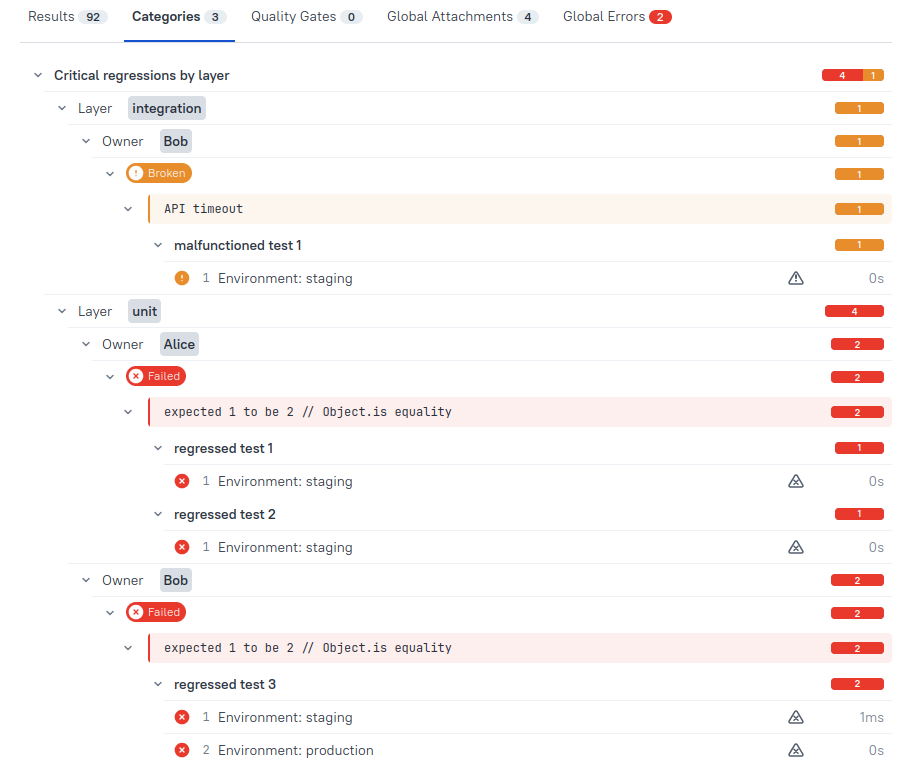
As shown in the examples above, custom categories are defined in the categories configuration field, which is an object with a rules array.
Every rule in the rules array is a custom category definition, with the following available settings:
name(string, required) - the category title shown in the report. Can be changed freely without affecting category identity whenidis set.id(string, optional) - a stable identifier for the category. Used to track category identity across report runs, so changes tonamedoesn't break history or create duplicate entries. If omitted,nameis used as theid. Must be a non-empty string with no leading/trailing whitespace or control characters. Two rules with the sameidare merged.matchers(required) - determines which test results fall into the category by looking for specified metadata in your test results.matcherscan be:
Object matcher - a plain object with any combination of:
statuses: TestStatus[] - matches against test status, e.g.["failed", "broken"].flaky: boolean - determines whether the category should include flaky tests. Requires history to work.labels: { [labelName]: string | RegExp } - matches against labels, as a regular expression. String input is converted into a RegExp object, so any regex metacharacters included in the string (like.,*, or^) will affect how the match behaves, e.g.{ owner: /^alice/ }will match all results where theownerlabel starts withalice.message: (sub)string | RegExp - matches against the error message as a regular expression. Same aslabels, any regex metacharacters in a provided string will affect the match.trace: (sub)string | RegExp - matches against the stack trace as a regular expression. Same aslabels, any regex metacharacters in a provided string will affect the match.transitions: TestStatusTransition[] - matches against transitions, e.g.["new", "regressed"]. Requires history to work.environments: string[] - matches against environments.
Tests fitting all of these conditions will be included (AND logic applies here).
Function matcher -
(data) => boolean, wheredatacontainsstatus,labels,message,trace,flaky,duration,transition,environment.Function matcher requires dynamic config to work, and just like with object matchers, you have to enable history to match against
flakyandtransition, and set environments to match againstenvironment.When using function matchers, you can additionally filter by
duration(e.g.(data) => data.duration > 5000), implement complex logic gates across multiple conditions and use arbitrary JavaScript expressions to fine-tune your categories.Array - any mix of the above; the test matches if any matcher in the array matches (OR logic applies).
groupBy(array, optional) - controls the nesting hierarchy inside the category tree. Each element is either a built-in string selector or a custom label object:- Built-ins:
"flaky","owner","severity","transition","status","environment","layer" - Custom labels:
{ label: "myCustomLabel" }
Example:
groupBy: ["severity", { label: "feature" }]creates two levels of grouping — first by severity, then by feature — before showing individual test results.- Built-ins:
groupByMessage(boolean, default true) - When true, adds an additional grouping level belowgroupBylevels, clustering tests that share the same error message. Long messages get a "show more/less" toggle in the UI.groupEnvironments(boolean, optional) - controls whether to group tests from different environments together (showing the test name once, with environment-labeled leaves beneath it).expand(boolean, default false) - whether the category is expanded by default in the UI.hide(boolean, default false) - whether to exclude this category from the tree entirely (matched tests are still consumed by the rule, preventing them from matching later rules and default categories).
You may also set categories: false to disable categories entirely (neither default categories nor custom rules will be applied).
Assorted custom categories configuration examples
import { defineConfig } from "allure";

export default defineConfig({
  name: "Allure Report 3",
  output: "./allure-report",
  historyPath: "./history.jsonl", // required for flaky and transitions detection
  categories: {
    rules: [
      // 1. Object matcher, all groupBy built-ins, groupByMessage, groupEnvironments explicit true
      {
        id: "critical-failures-by-layer",
        name: "Critical failures by layer",
        matchers: {
          statuses: ["failed"],
          labels: { severity: "critical" },
        },
        groupBy: ["severity", "owner", "layer", "status", "transition", "flaky"],
        groupByMessage: true,
        groupEnvironments: true,
        expand: true,
        hide: false,
      },

      // 2. Custom label selector in groupBy, groupEnvironments explicit false
      {
        id: "failures-by-component",
        name: "Failures by component",
        matchers: {
          statuses: ["failed", "broken"],
          labels: { component: /.+/ },
        },
        groupBy: [{ label: "epic" }, { label: "feature" }],
        groupByMessage: true,
        groupEnvironments: false,
        expand: false,
        hide: false,
      },

      // 3. Function matcher, groupByMessage false, groupEnvironments auto (omitted)
      {
        id: "long-running-tests",
        name: "Long running tests",
        matchers: (data) => data.duration > 5000,
        groupBy: ["owner"],
        groupByMessage: false,
        expand: false,
        hide: false,
      },

      // 4. Array of matchers (OR logic), mix of object and function
      {
        id: "flaky-or-regressed",
        name: "Flaky or regressed",
        matchers: [{ flaky: true }, (data) => data.transition === "regressed"],
        groupBy: ["flaky", "transition"],
        groupByMessage: true,
        groupEnvironments: true,
        expand: true,
        hide: false,
      },

      // 5. Message regex matching
      {
        id: "connection-errors",
        name: "Connection errors",
        matchers: {
          message: /ECONNRESET|connection failed|timeout/,
          statuses: ["broken"],
        },
        groupBy: ["environment", "layer"],
        groupByMessage: true,
        groupEnvironments: false,
        expand: false,
        hide: false,
      },

      // 6. Transition matcher, which includes new passed tests
      {
        id: "new-and-regressed-tests",
        name: "New and regressed tests",
        matchers: {
          transitions: ["new", "regressed"],
        },
        groupBy: ["transition", "owner"],
        groupByMessage: false,
        groupEnvironments: true,
        expand: true,
        hide: false,
      },

      // 7. Hidden category — consumes matched tests so they don't fall into defaults
      {
        id: "other-failed-and-broken-tests",
        name: "Other failed and broken tests",
        matchers: {
          statuses: ["failed", "broken"],
        },
        groupBy: [],
        groupByMessage: false,
        groupEnvironments: false,
        expand: false,
        hide: true, // category won't be shown in the report
      },
    ],
  },
  plugins: {
    awesome: {
      options: {
        reportName: "Allure Report",
        singleFile: false,
        reportLanguage: "en",
      },
    },
  },
  // environments configuration, set up for groupEnvironments to work
  environments: {
    staging: {
      matcher: ({ labels }) =>
        labels.some(({ name, value }) => name === "env" && value === "staging"),
    },
    production: {
      matcher: ({ labels }) =>
        labels.some(({ name, value }) => name === "env" && value === "production"),
    },
  },
});
Allure Report 2
In Allure Report 2 you can define custom categories by placing a categories file into the test results directory (see How it works). Allure checks each test against all the categories in the file, from top to bottom. The test gets assigned the first matching category. When no matches are found, Allure uses one of the default categories if the test fails or no category otherwise.
Some Allure plugins can generate the categories file automatically based on the project configuration. Check your integration's documentation.