Skip to content
Allure report logoAllure Report
Main Navigation ModulesDocumentationStarter Project

English

Español

English

Español

Appearance

Sidebar Navigation

Allure 3

Install & Upgrade

Install Allure

Upgrade Allure

Configure

Create Reports

How to generate a report

How to view a report

Improving readability of your test reports

Improving navigation in your test report

Migrate from Allure 2

Allure 2

Install & Upgrade

Install for Windows

Install for macOS

Install for Linux

Install for Node.js

Upgrade Allure

Create Reports

How to generate a report

How to view a report

Improving readability of your test reports

Improving navigation in your test report

Features

Test steps

Attachments

Test statuses

Sorting and filtering

Environments

Multistage Builds

Defect categories

Visual analytics

Test stability analysis

History and retries

Quality Gate

Global Errors and Attachments

Timeline

Export to CSV

Export metrics

Guides

JUnit 5 parametrization

JUnit 5 & Selenide: screenshots and attachments

JUnit 5 & Selenium: screenshots and attachments

Setting up JUnit 5 with GitHub Actions

Pytest parameterization

Pytest & Selenium: screenshots and attachments

Pytest & Playwright: screenshots and attachments

Pytest & Playwright: videos

Playwright parameterization

Publishing Reports to GitHub Pages

Allure Report 3: XCResults Reader

How it works

Overview

Glossary

Test result file

Container file

Categories file

Environment file

Executor file

History files

Test Identifiers

Integrations

Azure DevOps

Bamboo

GitHub Action

Jenkins

JetBrains IDEs

TeamCity

Visual Studio Code

Frameworks

Behat

Getting started

Configuration

Reference

Behave

Getting started

Configuration

Reference

Codeception

Getting started

Configuration

Reference

CodeceptJS

Getting started

Configuration

Reference

Cucumber.js

Getting started

Configuration

Reference

Cucumber-JVM

Getting started

Configuration

Reference

Cucumber.rb

Getting started

Configuration

Reference

Cypress

Getting started

Configuration

Reference

Jasmine

Getting started

Configuration

Reference

JBehave

Getting started

Configuration

Reference

Jest

Getting started

Configuration

Reference

JUnit 4

Getting started

Configuration

Reference

JUnit 5

Getting started

Configuration

Reference

Mocha

Getting started

Configuration

Reference

Newman

Getting started

Configuration

Reference

NUnit

Getting started

Configuration

Reference

PHPUnit

Getting started

Configuration

Reference

Playwright

Getting started

Configuration

Reference

pytest

Getting started

Configuration

Reference

Pytest-BDD

Getting started

Configuration

Reference

Reqnroll

Getting started

Configuration

Reference

REST Assured

Getting started

Configuration

Robot Framework

Getting started

Configuration

Reference

RSpec

Getting started

Configuration

Reference

SpecFlow

Getting started

Configuration

Reference

Spock

Getting started

Configuration

Reference

TestNG

Getting started

Configuration

Reference

Vitest

Getting started

Configuration

Reference

WebdriverIO

Getting started

Configuration

Reference

xUnit.net

Getting started

Configuration

Reference

On this page

Global Errors and Global Attachments Allure 3 ​

Starting with Allure Report 3, you can capture process-level information about your test runs, such as stdout and stderr outputs, test process errors and exit codes, and attach them to your test reports.

How to use ​

To take advantage of this feature, you have to run your tests with the allure run wrapper command:

bash
allure run -- <test command>

For example, if npm is your test runner:

bash
allure run -- npm test

What data you can capture ​

Global test run data appears in dedicated sections on the report homepage.

Global Exit Code ​

Global exit code is listed right under the report name and displays two values: the actual exit code (how the allure run process finished) and the original exit code (the exit code of the test process executed within allure run).

These values may be different, for example, if you set quality gate to tolerate a certain number of failed tests, or conversely, enforce some stricter quality standard than all tests in the run simply passing.

Global Errors ​

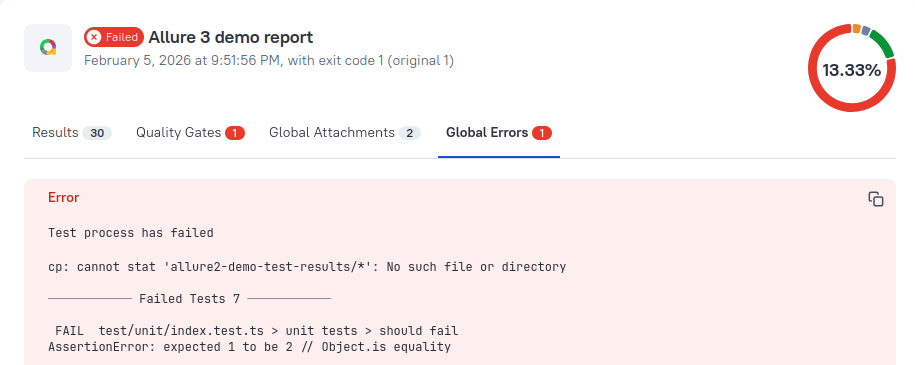
Global Errors tab contains any process-level exceptions encountered during the test run, with stack traces for unexpected errors.
Global Attachments ​

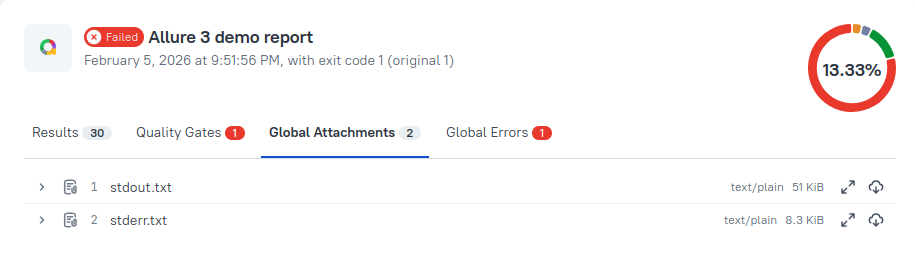
Global Attachments tab currently stores the entire stdout and stderr output generated by the test run.
Custom Globals ​

You can also configure your test pipeline to explicitly record errors and attachments as globals via the globals runtime API. It allows you to capture setup/teardown failures or any other information that doesn't belong to any individual test.

TIP

This feature will be gradually rolled out for all framework adapters with runtime API support, starting with Allure JavaScript. Please refer to your adapter's documentation to see if it's already supported.

How to turn the feature on and off ​

  • Default global errors and global attachments are on by default and may be turned off with the --ignore-logs option:

    bash
    allure run --ignore-logs -- <test command>

    Additionally, the Log plugin can limit the outputs saved as global attachments.

  • Custom globals captured via the globals runtime API can't be turned off except by removing them from the test code.

Interactions with other features ​

  • Global errors are integrated with quality gates. A failed quality gate is treated as a global error. But using the --ignore-logs option to turn off global errors and attachments does not affect quality gates operation, and does not hide failed quality gates in the report.

  • Multistage reports list all global errors and all global attachments from all stages included in the report.

Pager
Previous pageQuality Gate
Next pageTimeline
Powered by

Subscribe to our newsletter

Get product news you actually need, no spam.

Subscribe
Allure TestOps
  • Overview
  • Why choose us
  • Cloud
  • Self-hosted
  • Success Stories
Company
  • Documentation
  • Blog
  • About us
  • Contact
  • Events
© 2026 Qameta Software Inc. All rights reserved.