
Global Errors and Global Attachments
Starting with Allure Report 3, you can capture process-level information about your test runs, such as stdout and stderr outputs, test process errors and exit codes, and attach them to your test reports.
Errors and attachments that your Allure integration records for the whole test run (custom globals) are also shown in Allure Report 2.46.0 and newer, see Allure Report 2.
How to use
To take advantage of this feature, you have to run your tests with the allure run wrapper command:
allure run -- <test command>For example, if npm is your test runner:
allure run -- npm testWhat data you can capture
Global test run data appears in dedicated sections on the report homepage.
Global Exit Code
Global exit code is listed right under the report name and displays two values: the actual exit code (how the allure run process finished) and the original exit code (the exit code of the test process executed within allure run).
These values may be different, for example, if you set quality gate to tolerate a certain number of failed tests, or conversely, enforce some stricter quality standard than all tests in the run simply passing.

Global Errors
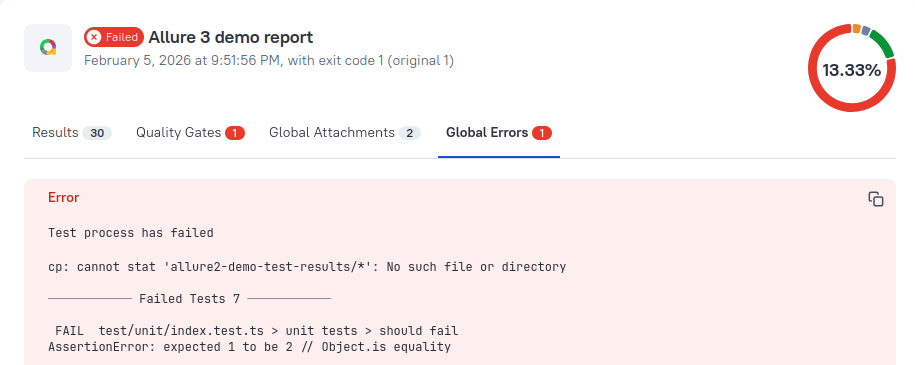
Global Errors tab contains any process-level exceptions encountered during the test run, with stack traces for unexpected errors.
Global Attachments
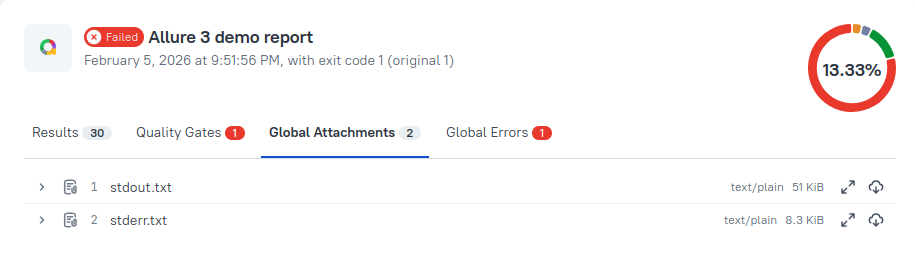
Global Attachments tab currently stores the entire stdout and stderr output generated by the test run.
Custom File Attachments
You can attach additional files to the report as global attachments using the globalAttachments configuration option. It accepts an array of glob patterns (relative to the working directory) and attaches any matching files to the report independently of any test result:
export default {
  globalAttachments: ["./logs/*.log", "./screenshots/global/**/*.png"],
};
Only files inside the working directory are included; paths that resolve outside it are silently skipped.
Custom Globals
You can also configure your test pipeline to explicitly record errors and attachments as globals via the globals runtime API. It allows you to capture setup/teardown failures or any other information that doesn't belong to any individual test.
TIP
This feature will be gradually rolled out for all framework integrations with runtime API support, starting with Allure JavaScript, Allure Java 3.0, Allure Dart, and Allure Ruby 2.30. Please refer to your integration's documentation to see if it's already supported.
In Allure Java 3.0 and newer, failures that don't belong to a single test, such as a failing @BeforeAll method or another fixture or lifecycle hook, are recorded as global errors automatically, instead of creating artificial test results. To record your own global error, call Allure.globalError() with a Throwable or a StatusDetails object:
import io.qameta.allure.Allure;

Allure.globalError(new IllegalStateException("Test database snapshot is outdated"));
Allure Java writes global errors to the test results directory, so they appear in the report even if you don't use the allure run wrapper.
In Allure Dart 1.3.0 and newer, when you use the drop-in imports, a failing setUp, tearDown, setUpAll, or tearDownAll callback is recorded as a global error, with a message such as setUpAll failed: <error message>. To record your own global error, call allure.globalError().
In Allure Ruby 2.30 and newer, a failing before(:suite) or after(:suite) hook in RSpec, or a failing BeforeAll or AfterAll hook in Cucumber, is recorded as a global error. To record your own global errors and attachments, see Run-level attachments and errors in the RSpec reference or the Cucumber.rb reference.
Allure Report 2
Allure Report 2.46.0 and newer shows the custom globals recorded by your Allure integration. If the test run has global errors, the Overview page shows a warning that the run completed with errors, even if all the tests passed. The errors, with their stack traces, and the global attachments are listed on the Run tab, which only appears in reports that have global errors or attachments.
How to turn the feature on and off
Default global errors and global attachments are on by default and may be turned off with the
--ignore-logsoption:bashallure run --ignore-logs -- <test command>Additionally, the Log plugin can limit the outputs saved as global attachments.
Custom globals captured via the globals runtime API can't be turned off except by removing them from the test code.
Interactions with other features
Quality gate results are not global errors: they are shown in the separate Quality Gates tab of the report. Using the
--ignore-logsoption to turn off global errors and attachments does not affect quality gates operation, and does not hide failed quality gates in the report.Multistage reports list all global errors and all global attachments from all stages included in the report.