
Resolutions Allure 3
Not every failed test needs a fresh investigation. A failure may already be reported as a bug, be temporarily ignored while someone works on a fix, or be expected in the current context. Resolutions let you mark such failures in the Allure configuration file. In the report, failures with a resolution get an icon in the test tree and are grouped on the Resolutions tab, and you can select them with the Resolution filter. The Failed and Broken counters only show the failures that still need attention. See Resolutions in the report for details.
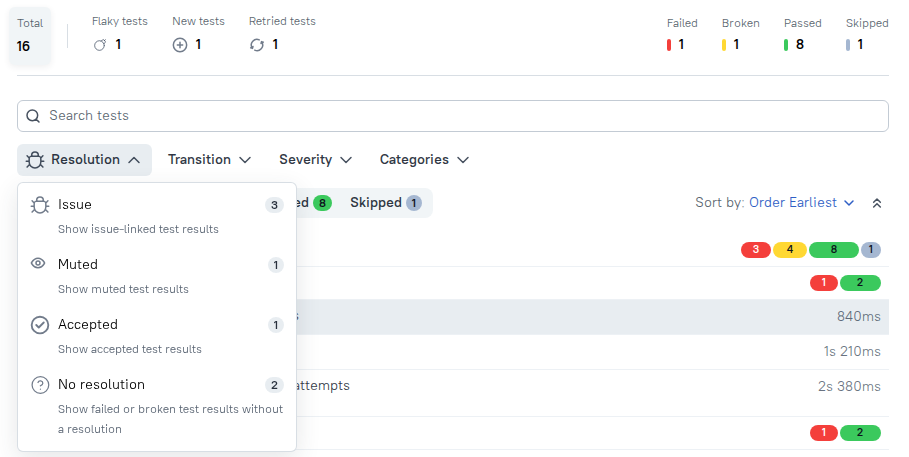
A resolution is assigned by a rule that matches test results by their error message, test case ID, retry hash or environment. Resolutions apply only to failed and broken test results: a passed or skipped result never gets a resolution, even if it matches a rule.
Resolution types
There are three resolution types:
| Resolution | Use it for | Required fields | Counted by quality gates |
|---|---|---|---|
issue | A failure caused by a known bug that is tracked in an issue tracker. | issue | Yes |
muted | A failure you want to ignore temporarily, for example, while the test is being fixed. | comment | No |
accepted | A failure that is expected, for example, a feature that isn't available yet. | comment | No |
Configure resolutions
Add the resolutions section to the configuration file. It contains a list of rules and, optionally, links templates that turn issue IDs into clickable links:
import { defineConfig } from "allure";

export default defineConfig({
  resolutions: {
    links: {
      jira: {
        urlTemplate: "https://jira.example.com/browse/%s",
        nameTemplate: "JIRA %s",
      },
    },
    rules: [
      {
        resolution: "issue",
        issue: { id: "SHOP-42", type: "jira" },
        messageRegexp: "Connection timeout",
        comment: "Payment gateway sandbox is slow",
      },
      {
        resolution: "muted",
        testCaseId: ["103"],
        comment: "Muted until the widget redesign lands",
      },
      {
        resolution: "accepted",
        environment: ["windows"],
        messageRegexp: "^Export format",
        comment: "The v1 export format is expected on Windows",
      },
    ],
  },
});{
"resolutions": {
"links": {
"jira": {
"urlTemplate": "https://jira.example.com/browse/%s",
"nameTemplate": "JIRA %s"
}
},
"rules": [
{
"resolution": "issue",
"issue": { "id": "SHOP-42", "type": "jira" },
"messageRegexp": "Connection timeout",
"comment": "Payment gateway sandbox is slow"
},
{
"resolution": "muted",
"testCaseId": ["103"],
"comment": "Muted until the widget redesign lands"
},
{
"resolution": "accepted",
"environment": ["windows"],
"messageRegexp": "^Export format",
"comment": "The v1 export format is expected on Windows"
}
]
}
}resolutions:
links:
jira:
urlTemplate: https://jira.example.com/browse/%s
nameTemplate: JIRA %s
rules:
- resolution: issue
issue:
id: SHOP-42
type: jira
messageRegexp: Connection timeout
comment: Payment gateway sandbox is slow
- resolution: muted
testCaseId: ["103"]
comment: Muted until the widget redesign lands
- resolution: accepted
environment: [windows]
messageRegexp: ^Export format
comment: The v1 export format is expected on WindowsEach rule contains:
resolution-issue,mutedoraccepted.- one or more matchers that select the test results.
issue(only forissuerules) - an object with the issueidand thetype, which must be one of the keys oflinks. Each issue ID can be used in only one rule.comment- an explanation shown in the report. Required formutedandacceptedrules, optional forissuerules.
Allure validates the resolutions configuration at startup. If the configuration is invalid (for example, a rule has no matchers, or a muted rule has no comment), the command fails with an error that lists every problem:
The provided resolutions config is invalid: resolutions.rules[1].comment must be a non-empty stringMatchers
A rule must contain at least one matcher. If a rule contains several matchers, a test result must satisfy all of them. Matchers that take a list are satisfied if any of the listed values matches.
| Matcher | Type | Matches a test result if... |
|---|---|---|
messageRegexp | string | its error message matches the JavaScript regular expression. The expression isn't anchored: "timeout" matches any message that contains timeout. |
testCaseId | string[] | its test case ID is in the list. Any of these IDs works: the test case ID calculated by Allure, the test's ID label (ALLURE_ID), or the test case ID reported by the Allure integration. |
retryHash | string[] | its retry hash is in the list. The retry hash identifies a specific test with specific parameters in a specific environment. |
environment | string[] | its environment ID is in the list. |
To find the test case ID or the retry hash of a test, open the test in the report and hover over the copy icon next to its full name. The menu lets you copy the full name, the Test case ID or the Retry hash.
TIP
Use testCaseId to match a test regardless of its parameters and environment, and retryHash to match only one specific variant of a parametrized test or only one environment. Note that the retry hash of the same test differs between environments.
Issue links
The links section defines one template for each issue type you use. The key (jira in the examples above) is the type you refer to in the issue.type field of the rules.
urlTemplate(required) - the URL of the issue, with exactly one%splaceholder for the issue ID. The resulting URL must be an absolutehttp://orhttps://URL.nameTemplate(optional) - the link text, with exactly one%splaceholder for the issue ID. If omitted, the issue ID itself is used as the link text.
With the configuration above, the SHOP-42 issue is shown in the report as a JIRA SHOP-42 link to https://jira.example.com/browse/SHOP-42.
Rule priority
A test result can get only one resolution. If it matches several rules, Allure picks the resolution in this order:
- The first matching
issuerule. - The
mutedflag set in the test result itself (see Resolutions from test results). - The
knownflag set in the test result itself. - The first matching
mutedrule. - The first matching
acceptedrule.
For example, if a failure is linked to an issue and also matches a muted rule, the report shows it as linked to the issue.
Resolutions from test results
A test result file can also mark a failure as muted or known by itself, via the muted or known flag in its statusDetails. Allure Report 3 converts these flags into resolutions:
- a result with
"muted": truegets the Muted resolution with the comment "Muted from result"; - a result with
"known": truegets the Accepted resolution with the comment "Accepted from result (known)".
This works even if the configuration file has no resolutions section.
Resolutions in the report
Test results with a resolution are marked with an icon in the test tree: a bug for Issue, an eye for Muted, and a check mark for Accepted.
Resolution filter. Use the Resolution dropdown above the test tree to show only the test results with the selected resolutions. Besides the three resolution types, it has the No resolution option, which shows the failed and broken test results that don't have a resolution yet - the failures that still need attention.
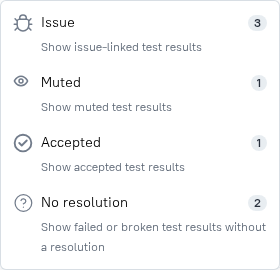
Counters and status filters. Failed and broken test results that have a resolution aren't included in the Failed and Broken counters on the right side of the summary, and the Failed and Broken status filters above the tree show only failures without a resolution. To see the resolved failures, use the Resolution filter.
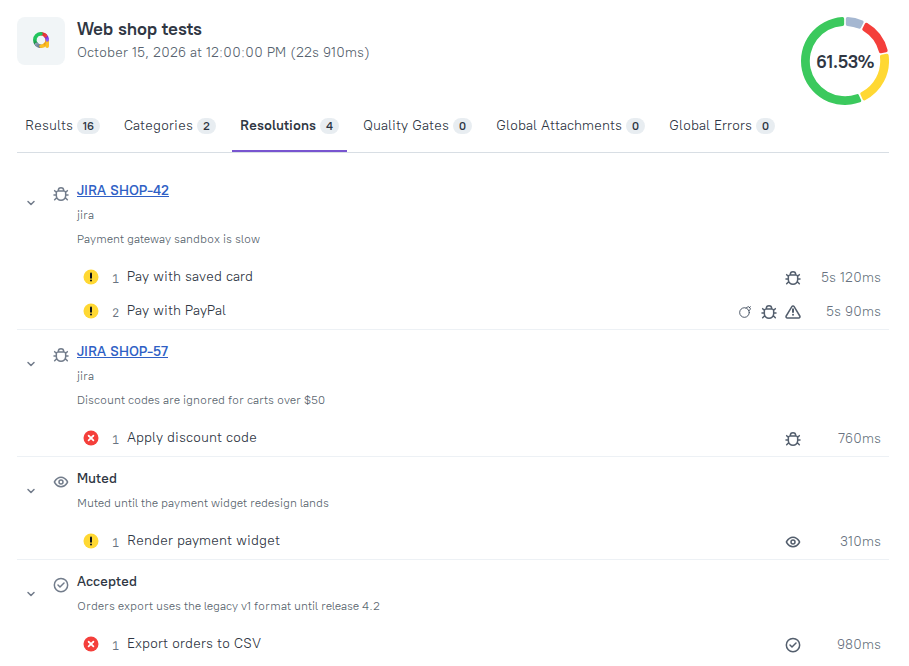
Resolutions tab. The Resolutions tab of the report groups the resolved test results: one group per issue, with its link, type and comment, then one Muted or Accepted group per comment.
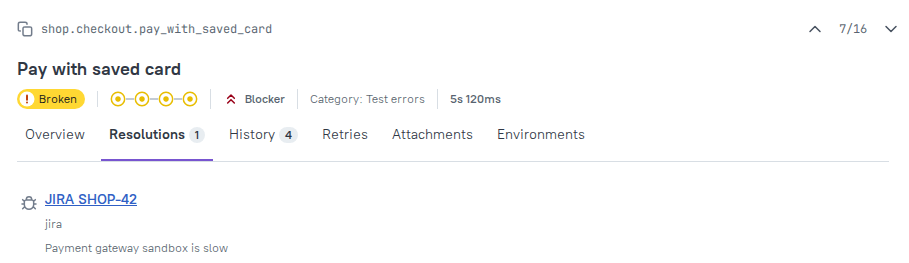
Test page. The page of a resolved test result has a Resolutions tab with the resolution, the issue link (for issue) and the comment.
Resolutions and quality gates
Quality gate rules ignore failures with the Muted and Accepted resolutions: they don't count towards maxFailures, successRate or any other rule. Failures linked to an Issue still count, because the bug they point to is still there.
The success rate shown in the report's pie chart excludes them as well.
When you run tests with allure run --rerun, muted and accepted failures are not rerun.
Known issues file
Every time Allure generates a report with resolutions configured, it also writes a known issues file: a JSON file with the issues that failures in the run are linked to, and the failed and broken test results linked to each of them. You can process this file in your CI pipeline, for example, to post the list of known issues to a chat.
By default, the file is written to known-issues.json in the current working directory. You can change the path in the configuration file or with the --known-issues command-line option; the path must end with .json:
import { defineConfig } from "allure";

export default defineConfig({
  resolutions: {
    knownIssuesPath: "./out/known-issues.json",
    rules: [
      // ...
    ],
  },
});allure generate --known-issues ./out/known-issues.json ./allure-resultsThe file is an output only: Allure doesn't read it back. To mark failures as known, use resolution rules. The file isn't part of the generated report, so it isn't published to Allure Report Storage either.
Resolutions in multistage builds
Dump archives store the resolutions assigned during each stage. When you build the final report from the archives, use the same resolutions configuration as in the stages, so that the final report shows the same resolutions.
Migrating from the known issues file
Earlier versions of Allure Report 3 supported known issues via a JSON file with a list of historyId values, configured with the top-level knownIssuesPath option and created with the allure known-issue command. Both have been replaced with resolutions: a configuration file that still contains the top-level knownIssuesPath option makes Allure fail with the "unsupported fields: knownIssuesPath" error.
To migrate:
- Remove the top-level
knownIssuesPathoption from the configuration file. - For each known issue, add an
issuerule toresolutions.rules. Match the tests bytestCaseId,retryHashormessageRegexpinstead ofhistoryId. - Add a
linkstemplate for your issue tracker. - If you used the known issues file to ignore failures without linking them to issues, use
mutedoracceptedrules instead.