
Self-hosted storage service Allure 3
Allure Report Storage is a free, open-source (Apache-2.0) service that gives Allure 3 somewhere to publish HTML reports and keep cross-run history, without relying on third-party hosting. You run it yourself - as a Docker container or a Cloudflare Worker - and Allure 3 talks to it through the built-in allureService client.
With allureService.accessToken set and publish: true on the relevant plugin(s), publishing is automatic: every report is uploaded, gets a shareable URL, and becomes part of that project's history.
How it works
Reports are organized by repository and branch rather than a fixed project ID, so history is scoped per branch by default, except in pull request pipelines (see History depth and branches). Allure 3 detects repo and branch automatically: from CI-provided environment variables on a supported CI server, or otherwise from the current git repository name and checked-out branch.
Each publish:
- creates a draft report for that
repo/branch; - uploads the generated report files;
- marks the report complete and attaches a history data point.
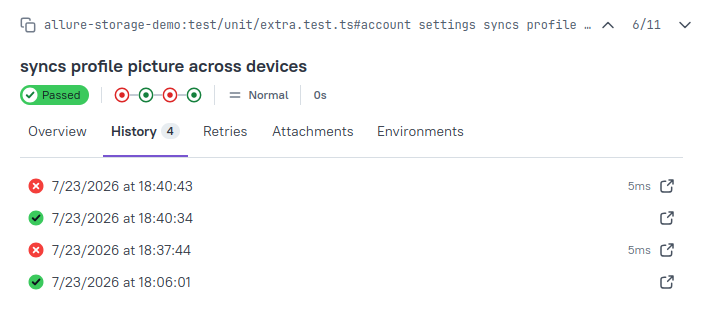
A completed report is immutable: it can only be deleted, not modified. The history data point is what powers History and retries across separate runs.
Deployment
Run it via the Docker guide or the Cloudflare Worker guide. Both cover full setup step by step. Neither needs an external database or bucket by default: Docker uses a bundled SQLite database and local disk, the Worker uses Cloudflare D1 and R2.
Where report files are stored is independent of where the service runs:
- Local filesystem - default for Docker/Node; files go under the configured data directory.
- Any S3-compatible bucket - AWS S3, R2's S3-compatible endpoint, or another provider such as MinIO. See the Docker guide for setup.
- Cloudflare R2 - used automatically via a native binding when running as a Worker.
Connecting Allure 3 to the storage service
Mint a report-access token using the bootstrap ACCESS_TOKEN set up during deployment:
curl -sS -X POST http://localhost:3000/api/token \
  -H "Authorization: Bearer storage_bootstrap_token"
This returns a token in the ars1.<payload>.<signature> format. Unlike the bootstrap token, it's safe to hand to CI: it only authorizes publishing and history reads. It's also self-describing: the payload embeds the storage instance's URL, so Allure 3 needs no separate server-address setting.
Running behind a reverse proxy
By default, the embedded URL is the address the token request was sent to. If the service runs behind a reverse proxy or TLS termination, this may differ from the public URL that Allure 3 should use. In this case, set the service's PUBLIC_URL environment variable (Allure Report Storage 1.1.0 and later) to the public origin, for example https://reports.example.com, before minting tokens. See the Docker and Cloudflare Worker guides.
The value must be an absolute HTTP or HTTPS origin, optionally with a port, but without a path, a query, a fragment, or credentials. Otherwise, the service does not start.
Tokens minted before setting PUBLIC_URL keep the URL they were minted with. Mint new tokens and replace the old ones in your Allure 3 and CI configuration.
Add it to the Allure 3 configuration, alongside publish: true on the plugin(s) to publish:
import { defineConfig } from "allure";

export default defineConfig({
  name: "Allure Report",
  plugins: {
    awesome: {
      options: {
        publish: true, // explicitly specify which reports should be published
      },
    },
  },
  allureService: {
    accessToken: "ars1...",
  },
});
From here, running tests through Allure 3 publishes the report automatically.
Choosing a main branch
A repository's main branch defaults to main. If yours is named differently, set it explicitly (also using the bootstrap token) so other branches compare against the right baseline:
curl -sS -X POST http://localhost:3000/api/projects/main-branch \
  -H "Authorization: Bearer storage_bootstrap_token" \
  -H "Content-Type: application/json" \
  -d '{ "repo": "repo_name", "main_branch": "main_branch_name"}'
History depth and branches
Every completed report's history point is kept permanently: nothing expires automatically, only explicit deletion removes it. Allure 3 fetches the 10 most recent points per branch by default; set historyLimit to fetch further back:
export default defineConfig({
  historyLimit: 50,
});
Unlike historyPath (which prunes older entries from a local file), historyLimit here only limits what's fetched: full history stays stored regardless. The two options are also mutually exclusive: historyPath is ignored if allureService.accessToken is set.
A non-main branch's history is padded with the main branch's older reports when it doesn't have enough of its own to fill the requested count, extending its own timeline further back, never interleaved with it. A branch with one or two publishes still gets a populated trend chart this way. Main's own history is never padded, and a branch with enough reports of its own doesn't get padded either. This is based on branch name, not git ancestry: a git-orphan branch is treated the same as a real feature branch. Only GET /api/history (and therefore trend charts and the history tab) does this blending; the reports tree page always groups strictly by branch.
Pull request and merge request pipelines work differently. If the CI server provides the pull request's target branch (for example, GITHUB_BASE_REF on GitHub Actions, CI_MERGE_REQUEST_TARGET_BRANCH_NAME on GitLab CI, or CHANGE_TARGET on Jenkins), Allure reads the history of the target branch on every run. The report is still published under the pull request's own branch, not the target branch, but the pull request's own earlier runs don't appear in its history. As a result, tests added in the pull request are shown as new on every run, and the report shows how the change compares with the target branch.
The same applies to performance metrics: until a branch has enough reports of its own, its metric deltas, and the delta quality gate rules, compare its reports with the main branch's latest report. In a pull request pipeline, they always compare with the target branch's latest report.
Browsing published reports
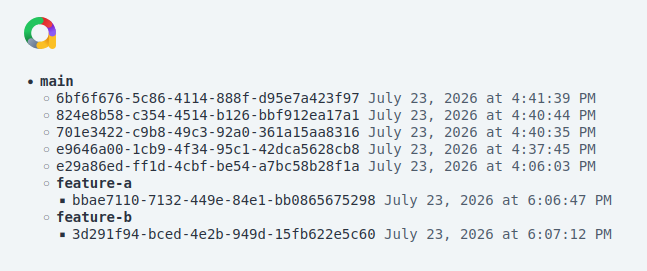
Every instance also serves a page listing completed reports for a repository, grouped by branch:
https://<your-storage-domain>/reports/tree?repo=<repo>Useful for finding a previous report without digging through CI logs.
Deleting a report
A completed report can only be deleted, not edited: this removes both its files and its history point, authenticated with a report-access token rather than the bootstrap token:
curl -sS -X POST http://localhost:3000/api/report/<report-uuid>/delete \
  -H "Authorization: Bearer ars1..."
Afterward, the report's URL stops resolving, and it disappears from GET /api/history and the tree page. If it was one of main's reports, branches that were padded with it fall back to whatever remains.