
Allure GitHub Action Allure 3
Allure Report 3 comes with support for the Allure GitHub Action.
With this action you can automatically post test run summaries as pull request comments in your GitHub repository. The summaries contain:
- A visual summary table of the run and generated reports
- Test run duration
- Amount of new, flaky and retried tests in the run
- Full report link, if
remote-hrefis configured or the report was published to the Allure Storage Service
Additionally, if your allure configuration includes quality gate settings, you get a pass/fail Quality Gate GitHub Check on your pull requests.
Prerequisites
Allure Report Generation Workflow
To work properly, this GitHub Action requires that your workflow use Allure 3 and relevant Allure integrations depending on your framework to generate an HTML Allure Report.
HTML reports produce the {report-directory}/summary.json file which the action reads, turns into a readable summary table, and posts as a pull request comment. Reports also include a {report-directory}/test-results.json file with each test's name, status, and duration, which the action uses to resolve individual tests for Section Comments.
TIP
The action will not fully work if you're generating CSV reports, as the CSV plugin doesn't create a summary.json file. It may also not work with third party HTML report plugins, if they don't create a summary.json.
GitHub Permissions
Add pull-requests and checks permissions to your workflow to enable comments and checks for pull requests in your repository:
permissions:
  pull-requests: write
  checks: write
Configuration
Add the action to your workflow right after the step at which you produce the Allure Report:
- name: Run tests
  run |-
    # run your tests that generate Allure Report data

- name: Run Allure Action
  uses: allure-framework/allure-action@v0
  with:
    # Path to the generated report directory
    # By default, it's set to `./allure-report`
    report-directory: "./allure-report"
    # GitHub Token that's used for posting the comments in Pull Requests
    github-token: ${{ secrets.GITHUB_TOKEN }}
Minimal Working Example
name: Tests with Allure Report

on:
  pull_request:
    branches: [main]

permissions:
  pull-requests: write
  checks: write

jobs:
  test:
    runs-on: ubuntu-latest

    steps:
      # 1. Checkout code
      - name: Checkout
        uses: actions/checkout@v4

      # 2. Setup your language/runtime
      - name: Setup Node.js
        uses: actions/setup-node@v4
        with:
          node-version: "20"

      # 3. Install dependencies
      - name: Install dependencies
        run: npm ci

      # 4. Run tests (must use Allure reporter)
      - name: Run tests and generate report
        run: npx allure run -- npm run test
        # This generates allure-results/ directory and creates allure-report/ with summary.json

      # 5. Post summary to PR
      - name: Run Allure Action
        uses: allure-framework/allure-action@v0
        with:
          report-directory: "./allure-report"
          github-token: ${{ secrets.GITHUB_TOKEN }}
Report URL (remote-href)
To add a View link to the summary table and turn new/flaky/retry counts into clickable filter links, provide the base URL where your report is hosted:
- name: Run Allure Action
  uses: allure-framework/allure-action@v0
  with:
    report-directory: "./allure-report"
    github-token: ${{ secrets.GITHUB_TOKEN }}
    remote-href: "https://my-org.github.io/my-repo/"
This is useful when publishing reports to GitHub Pages or any other static hosting. If the report was published to the Allure Storage Service, the URL is embedded in the report automatically and remote-href is not needed.
Section Comments (sections)
By default, the action posts only the summary table. To also post collapsible comments that list individual tests, use the sections input:
- name: Run Allure Action
  uses: allure-framework/allure-action@v0
  with:
    report-directory: "./allure-report"
    github-token: ${{ secrets.GITHUB_TOKEN }}
    sections: |
      new
      flaky
Supported values: new, flaky, retry, all. The input accepts comma- or newline-separated values.
Each section is posted as a separate collapsible comment listing tests with their status, name, and duration, resolved from the {report-directory}/test-results.json file - keep the full report directory intact when passing it to the action, or affected tests are silently dropped from the list. If remote-href is configured, each test name links directly to its result in the report. Oversized lists are truncated and a More link to the filtered remote report is appended when available. Section comments from previous runs are automatically cleaned up when sections are removed.
Workflows not triggered by pull requests (pr-number, head-sha)
By default, the action finds the pull request to comment on from the pull_request event. For workflows triggered by other events, such as issue_comment, workflow_dispatch, or workflow_run, pass the pull request number via the pr-number input. When the pull_request event data is available, it takes precedence over pr-number.
To attach the checks to the pull request's head commit instead of the commit that triggered the workflow, also pass the head-sha input. For example, in an issue_comment workflow, the github.sha context value points to the default branch, not to the pull request, so resolve the head commit first:
on:
  issue_comment:
    types: [created]

permissions:
  pull-requests: write
  checks: write

jobs:
  report:
    if: ${{ github.event.issue.pull_request && contains(github.event.comment.body, '/run-tests') }}
    runs-on: ubuntu-latest
    steps:
      - name: Resolve pull request head
        id: pr
        env:
          GH_TOKEN: ${{ github.token }}
          GH_REPO: ${{ github.repository }}
          PR_NUMBER: ${{ github.event.issue.number }}
        run: |
          head_sha="$(gh pr view "$PR_NUMBER" --json headRefOid --jq .headRefOid)"
          echo "head-sha=$head_sha" >> "$GITHUB_OUTPUT"

      # check out the pull request head, run your tests, and generate the report

      - name: Run Allure Action
        uses: allure-framework/allure-action@v0
        with:
          report-directory: "./allure-report"
          github-token: ${{ github.token }}
          pr-number: ${{ github.event.issue.number }}
          head-sha: ${{ steps.pr.outputs.head-sha }}
The pr-number and head-sha inputs are available in Allure Action 0.11.0 and newer.
Outputs
Summary Table Comment
The action posts a comment like this:
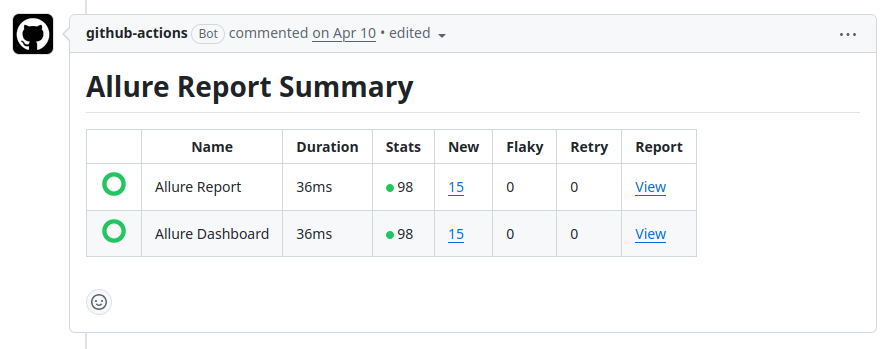
If you have multiple reports set up (for example one general report and one dashboard report), you'll get a separate table row for each report. The action scans report-directory recursively for all summary.json files.
Section Comments
If the sections input is configured, the action posts additional collapsible comments — one per enabled section — listing individual tests. See Section Comments above for details.
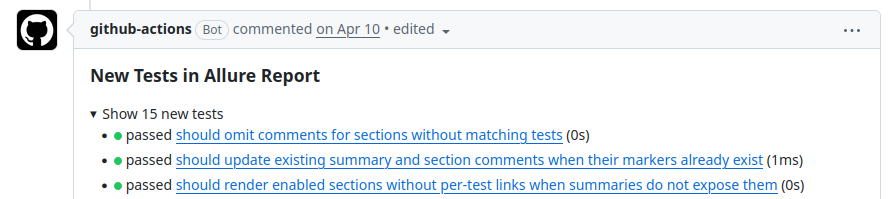
Section comments are always posted collapsed, so they won't clutter your pull requests.
Quality Gate Check
If quality gates are configured in your Allure setup, the action creates a GitHub Check:
- ✅ Success - All quality gates passed
- ❌ Failure - One or more quality gates failed
The check includes details about which rules failed.
To determine the outcome, the action looks for quality gate data in the {report-directory}/quality-gate.json file.