
Quality Gate Allure 3
Quality Gate is a built-in feature of Allure Report 3 that allows you to enforce a quality standard on your project, typically when it's about to advance from one deployment stage to another. This feature fails a test run if it violates the defined set of rules, thus preventing the deployment of a project that doesn't meet the desired quality standard.
Allure Report has these built-in rules:
| Rule name | Rule description | Rule function name | Units |
|---|---|---|---|
maxFailures | Maximum allowed number of failed and broken tests | maxFailuresRule | Number of tests |
minTestsCount | Minimum required number of executed tests | minTestsCountRule | Number of tests |
successRate | Minimum required success rate: passed tests divided by passed, failed and broken tests (skipped and unknown tests are excluded) | successRateRule | Ratio (0.0 to 1.0) |
newTests | If true, the run must contain at least one new test, i.e., a test that isn't in the history | newTestsRule | Boolean |
maxDuration | Maximum allowed duration for any single test | maxDurationRule | Milliseconds |
allTestsContainEnv | All tests must belong to the specified environment | allTestsContainEnvRule | Environment ID (string) |
environmentsTested | Every specified environment must have at least one test in the run | environmentsTestedRule | Array of environment IDs |
metricMax | Maximum allowed average value of a performance metric | metricMaxRule | Object, see Metric rules |
metricMin | Minimum required average value of a performance metric | metricMinRule | Object, see Metric rules |
metricMaxDelta | Maximum allowed change of a performance metric since the previous run | metricMaxDeltaRule | Object, see Metric rules |
metricMaxDeltaPercent | Maximum allowed change of a performance metric since the previous run, in percent | metricMaxDeltaPercentRule | Object, see Metric rules |
The newTests, metricMaxDelta and metricMaxDeltaPercent rules compare the run with previous runs, so they require history: either a history file set with historyPath, or Allure Report Storage. Without history, no test is considered new.
All rules ignore earlier attempts of retried tests (only the latest attempt counts) and failures marked as Muted or Accepted with resolutions. Failures linked to an Issue resolution are still counted.
You can also use third-party rules and write entirely custom rules yourself.
Basic Configuration
Built-in Rules
As other advanced features, you can configure Quality Gate in the runtime configuration file.
Depending on format, add these lines to it:
import { defineConfig } from "allure";

export default defineConfig({
  qualityGate: {
    rules: [
      {
        <rule-name>: <expected-value>,
      },
    ],
 },
}){
"qualityGate": {
"rules": [
{
"<rule-name>": "<expected-value>"
}
]
}
}qualityGate:
rules:
- <rule-name>: <expected-value>What config format to use?
Generally, if you use only the built-in rules without any additional logic applied, you can stick to static .json or .yaml config files. If you want to customize anything, apply additional filters to analyzed test results, or use any custom rules, you need the dynamic .mjs or .js config, as you'll be adding executable code to it.
For example:
import { defineConfig } from "allure";

export default defineConfig({
  qualityGate: {
    rules: [
      {
        maxFailures: 5,
        minTestsCount: 30,
        // executable code that validates only test results with critical severity label
        filter: (tr) =>
          tr.labels.some((label) => label.name === "severity" && label.value === "critical"),
      },
    ],
  },
});
If either of the maxFailures and minTestsCount rules you configured here fail, your run will complete with exit code 1, and Quality Gate will print a message reporting what rule failed to the console.
If no Quality Gate rules fail, the exit code will be 0. When Quality Gate is configured, it determines the exit code of allure run: if some tests fail, but their number stays within the limits you set, the exit code is still 0. The report shows both the actual exit code and the original exit code of the test process (see Global exit code).
The Quality Gates tab of the report lists the results of all rules, both failed and passed. For a rule that depends on specific tests, such as maxFailures, expand Related test results to see these tests.
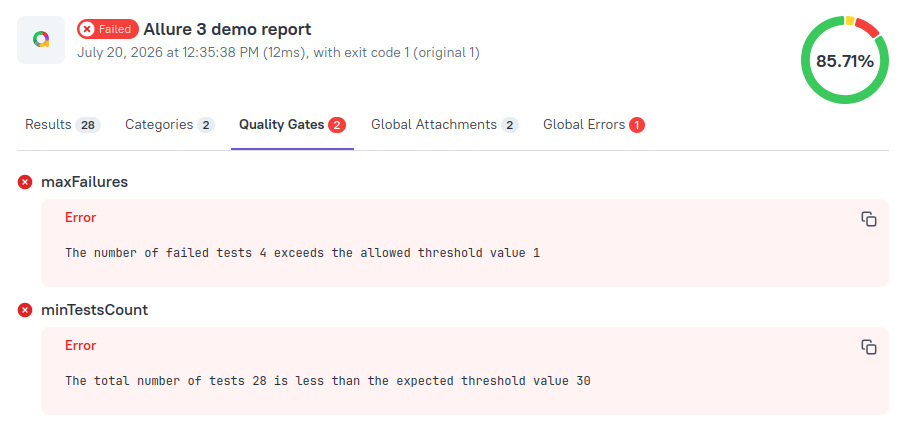
Fast Fail
If you want to terminate the test run immediately when at least one Quality Gate rule fails - add the fastFail property to the rule set:
import { defineConfig } from "allure";

export default defineConfig({
  qualityGate: {
    rules: [
      {
        maxFailures: 5,
        fastFail: true,
      },
    ],
  },
});
Not all rules make sense with fastFail. We do not recommend enabling fastFail in rulesets including rules like minTestsCount and successRate, because the values they check can only be calculated correctly after all test results are received, i.e., after the test run is already over. If you want to use these rules, we recommend moving them into a new rule set (see below) with fastFail set to false.
Multiple Rule Sets
You can also define multiple Quality Gate rule sets. This can be useful when you want to separate fast-failing rules from all others:
import { defineConfig } from "allure";

export default defineConfig({
  qualityGate: {
    rules: [
      {
        // use id field to make ruleset's rules easier to identify
        id: "fast-failing ruleset",
        maxFailures: 5,
        fastFail: true,
      },
      {
        id: "non-fast-failing ruleset",
        successRate: 0.95,
      },
    ],
  },
});
Metric Rules
The metricMax, metricMin, metricMaxDelta and metricMaxDeltaPercent rules check the performance metrics collected during the run. Each of them takes an object with the metric key and the limit value:
import { defineConfig } from "allure";

export default defineConfig({
  historyPath: "./history.jsonl",
  qualityGate: {
    rules: [
      {
        // the average page load time must not exceed 1500
        metricMax: { key: "page.load", value: 1500 },
        // the average API throughput must be at least 100
        metricMin: { key: "api.rps", value: 100 },
        // the average page load time must not grow by more than 200 since the previous run
        metricMaxDelta: { key: "page.load", value: 200 },
        // the average API throughput must not drop by more than 10% since the previous run
        metricMaxDeltaPercent: { key: "api.rps", value: 10 },
      },
    ],
  },
});- All metric rules check the average value of all measurements with the given key in the current run.
- A metric rule fails if the run has no measurements with the given key.
metricMaxDeltaandmetricMaxDeltaPercentcompare the current average with the value saved in the history for the previous run, so they require history: either a history file set withhistoryPath, or Allure Report Storage. If there is no previous value, the rule passes. With Allure Report Storage, the first reports of a new branch are compared with the main branch, and the reports of a pull request pipeline are compared with its target branch (see Performance Metrics).- If the metric has the
bettersetting in theperformanceconfiguration, the delta rules only fail on changes for the worse: an increase forbetter: "lower", a decrease forbetter: "higher". Without it, a change in either direction counts.
Run Allure with Quality Gates Enabled
There are three Allure CLI commands that apply quality gates:
allure run- applies the quality gates marked withfastFailas the test run proceeds and checks if it should be terminated early; once the test run finishes, it applies all of the quality gates to the final test results.allure generate- applies all of the quality gates to the test results it reads. It generates the report (or writes the dump archive, ifdumpis configured) first, and then exits with code 1 if any rule failed.allure quality-gate- applies the quality gates against all test results from all matched directories. Doesn't generate reports.
allure run and allure generate always use the rules specified in the configuration file.
TIP
The fastFail rule sets can only stop the test run early if the Allure integration writes each test result as soon as the test finishes. Some integrations write all results at the end of the run; in this case, the rules are applied when the test run finishes.
allure quality-gate uses the configuration by default, but also allows defining the rules via the CLI by using these options:
--max-failures--min-tests-count--success-rate
If any of these are used, the configuration file is ignored and the rules from the CLI command are used instead.
You can also assign an environment to all test results checked by the command, the same way as with allure run. This affects environment-related rules, such as allTestsContainEnv, and the environment shown in the quality gate results:
--environment- environment ID (the config key; letters, digits, underscores, and hyphens only)--environment-name- environment display name;--environmenttakes priority if both are given
For example:
allure quality-gate --max-failures 5 --environment prod_env
allure quality-gate --max-failures 5 --environment-name "Production"
Reruns
Quality gates work with the --rerun option of allure run, which restarts the test command to retry failed tests:
allure run --rerun 2 -- npm testThe number you pass is the total number of restarts available to the run. Each restart uses one:
- When the test command finishes, Allure restarts it with a test plan that contains the failed and broken tests (except the ones with the Muted or Accepted resolutions) and the tests related to failed quality gate rules. The test plan is passed via the
ALLURE_TESTPLAN_PATHenvironment variable, so the Allure integration must support test plans. - When a
fastFailrule set stops the test command early, the results are incomplete, so Allure restarts the full test command.
The quality gates are applied to the latest attempt of each test. With --rerun 0, or without --rerun, a fastFail rule set stops the run without restarting it.
Multi-Environment Builds
If you run tests in several environments and build a single report from dump archives, you can apply quality gates at either stage, or both:
- In each environment. Add
qualityGateto the configuration used for the test run in each environment. Each run checks its own test results and fails if they violate the rules. The results are saved to the dump archive, and the final report shows them per environment. If the configuration used to build the final report has noqualityGate, the rules aren't applied again. - In the final report. Add
qualityGateto the configuration used to build the final report withallure generate --dump .... The rules are applied to the combined test results from all environments. Use this if you need one pass/fail decision for the whole build, for example, for the Quality Gate check of the GitHub Action, which reads thequality-gate.jsonfile generated with the final report.
For example, with a configuration file that applies quality gates when the ALLURE_QUALITY_GATE environment variable is set:
import { defineConfig } from "allure";

export default defineConfig({
  ...(process.env.ALLURE_QUALITY_GATE ? { qualityGate: { rules: [{ maxFailures: 0 }] } } : {}),
});
Each environment then runs the tests without the quality gate:
allure run --environment=linux --dump=allure-results-linux -- npm testThe final job applies the quality gate to the combined results:
ALLURE_QUALITY_GATE=1 allure generate --dump "allure-results-*.zip"View Quality Gate Results
Quality gate results are available in several places:
- Terminal.
allure run,allure generateandallure quality-gateprint the failed rules to the console. - Report. The Quality Gates tab of the report shows all rules, both failed and passed (see Built-in Rules).
allure log. Theallure logcommand prints the failed rules after the test results. Add--all-quality-gate-resultsto also print the passed rules, or--no-quality-gate-resultsto hide quality gate results. When you use the Log plugin in the configuration file, use itsqualityGateResultsandqualityGateFilteroptions instead.quality-gate.json. Thequality-gate.jsonfile in the report directory contains the results of all rules in the JSON format. For each rule, it lists the IDs of the related test results; the details of these test results are in thetest-results.jsonfile in the same directory. CI integrations, such as the GitHub Action, use these files to report the quality gate status.
Advanced Configuration
The features in this section require dynamic config files (.mjs/.js) that can execute JavaScript code.
Custom Filters
You can apply custom filtering logic to the test results Quality Gate analyzes.
The second ruleset in the example below validates only test results with critical severity label: if any such test fails, the entire run fails immediately, because fastFail is set to true for this ruleset.
import { defineConfig } from "allure";

export default defineConfig({
  qualityGate: {
    rules: [
      // first ruleset allows to have up to 10 failed tests in total, it won't fail in runtime and will report validation result in the end
      {
        id: "first-set",
        maxFailures: 10,
      },
      // second ruleset fails immediately if there is at least one critical test failure
      {
        id: "second-set",
        maxFailures: 0,
        fastFail: true,
        // validate only test results with critical severity label
        filter: (tr) =>
          tr.labels.some((label) => label.name === "severity" && label.value === "critical"),
      },
    ],
  },
});
use Field
The use array in the Allure 3 config is a list of rule implementations, where each implementation is an object defining how a specific rule works.
The default list includes the implementations of all the built-in rules, so if you're only using them, like in the examples from the Basic Configuration section, you can omit it.
But whenever you need to introduce a custom rule or tweak an existing one, you must provide your own list, and this list must include the implementations of all rules mentioned in your rule sets - both default and custom.
You should import built-in rule implementations from allure/rules, and custom rule implementations from whichever packages or files contain them:
import { defineConfig } from "allure";
import { maxFailuresRule } from "allure/rules";
import { ruleImplementation1, ruleImplementation2 } from "custom-rules";

export default defineConfig({
  qualityGate: {
    rules: [
      {
        maxFailures: 5,
        rule1: 1,
        rule2: 2,
      },
    ],
    use: [
      maxFailuresRule, // implements maxFailures, which is built-in, but you still have to list it, because you're also using custom rules
      ruleImplementation1, // implements custom rule1
      ruleImplementation2, // implements custom rule2
    ],
  },
});
Customize a Rule Message
If a rule fails, Allure prints a message to the console. You can customize this message to your liking by redefining the message function in the use array of the Quality Gate settings.
import { defineConfig } from "allure";
import { maxFailuresRule } from "allure/rules";

export default defineConfig({
  qualityGate: {
    rules: [
      {
        maxFailures: 5,
      },
    ],
    use: [
      {
        // don't forget to use rest spread operator to keep the rule's other fields intact
        ...maxFailuresRule,
        message: ({ expected, actual }) => `Custom message: expected ${expected}, got ${actual}`,
      },
    ],
  },
});
Use External Rules
You can use third-party Quality Gate rules:
- install the package with the rule to your project
- import the rules from the package
- provide them to the
usefield in the quality gate configuration:
import { defineConfig } from "allure";
import { rule1, rule2 } from "custom-rules-package";

export default defineConfig({
  qualityGate: {
    rules: [
      // define rulesets according the external rules signature
    ],
    use: [rule1, rule2],
  },
});
TIP
If you want to use default and external rules together, make sure to import default rules from the allure/rules package and include them in the use array as well:
import { defineConfig } from "allure";
// import default rules at once
import { qualityGateDefaultRules } from "allure/rules";
// or import them separately
import {
  allTestsContainEnvRule,
  environmentsTestedRule,
  maxDurationRule,
  maxFailuresRule,
  minTestsCountRule,
  successRateRule,
} from "allure/rules";
import { rule1, rule2 } from "custom-rules-package";

export default defineConfig({
  qualityGate: {
    rules: [
      // define rulesets according the external rules signature
    ],
    use: [...qualityGateDefaultRules, rule1, rule2],
  },
});
If you don't re-assign use field, Allure will use only the default rules automatically without additional imports.
Create Custom Rules
You can create your own quality gate rules by implementing the QualityGateRule<T,K=T> interface, where T is the type of the value that the rule is checking, and K is the type of the intermediate result that the rule is using to keep the state between the test results batches it processes.
WARNING
If you're using TypeScript, make sure to compile your custom rule file before use! Allure doesn't support on-the-fly TypeScript compilation.
This is a simplified version of the built-in maxFailures rule:
import { filterUnsuccessful } from "@allurereport/core-api";
import { type QualityGateRule } from "@allurereport/plugin-api";

export const maxFailuresRule: QualityGateRule<number> = {
  rule: "maxFailures",
  message: ({ actual, expected }) =>
    `The number of failed tests ${String(actual)} exceeds the allowed threshold value ${String(expected)}`,
  successMessage: ({ actual, expected }) =>
    `The number of failed tests ${String(actual)} is within the allowed threshold value ${String(expected)}`,
  validate: async ({ trs, expected, state }) => {
    const previous = Number(state.getResult() ?? 0);
    const failedTrs = trs.filter(filterUnsuccessful);
    const testResults = failedTrs.map((tr) => tr.id);
    const actual = previous + failedTrs.length;

    state.setResult(actual, testResults);

    return {
      success: actual <= expected,
      actual,
      testResults,
    };
  },
};import { filterUnsuccessful } from "@allurereport/core-api";
export const maxFailuresRule = {
rule: "maxFailures",
message: ({ actual, expected }) =>
`The number of failed tests ${String(actual)} exceeds the allowed threshold value ${String(expected)}`,
successMessage: ({ actual, expected }) =>
`The number of failed tests ${String(actual)} is within the allowed threshold value ${String(expected)}`,
validate: async ({ trs, expected, state }) => {
const previous = state.getResult() ?? 0;
const failedTrs = trs.filter(filterUnsuccessful);
const testResults = failedTrs.map((tr) => tr.id);
const actual = previous + failedTrs.length;
state.setResult(actual, testResults);
return {
success: actual <= expected,
actual,
testResults,
};
},
};The rule object contains the following fields:
rule - the rule name which is used to identify the rule in the configuration file; it is also used in the validation messages printed to the console and shown in the report
message - function that formats the message shown if the rule fails; can be redefined in the configuration file:
- takes an object with the following fields:
actual: the actual value calculated by the validate function.expected: the expected value configured in the rule set.
- must return a string to display.
successMessage (optional) - function that formats the message shown if the rule passes. It takes the same arguments as message. If omitted, Allure uses a generic message with the actual and expected values.
validate - validation function that implements the validation logic:
takes an object with the following fields:
trs: an array of test results. These can be all test results produced in the run or just a portion of it, i.e., a batch. Earlier attempts of retried tests and failures with the Muted or Accepted resolutions are already excluded.expected: the expected value of type T configured in the rule set.state: an object that keeps the state across multiple validate calls against different test result batches. See an example below.environment: the ID of the environment the rules are applied to, if any.metrics: an array of the performance metrics collected in the run.previousHistory: an array of the metric values saved in the history file for previous runs.
must return a promise that resolves to an object with the following fields:
success: the validation result (true or false).actual: the calculated value that the rule has checked.testResults: an array of IDs of the test results related to the rule, for example, the failed tests counted bymaxFailures. The report lists these tests under Related test results. Return an empty array if the rule doesn't depend on specific tests.
To create a custom rule, define an object with the structure described above.
state and Fast Fail Logic
Allure Report applies the quality gate rules in two different ways:
when the test run completes without triggering fast fail, and all test results are ready: Allure simply applies all quality gate rules to the whole set of results.
while the test run is in progress: Allure receives batches of test results from the test framework as it progresses over the tests and checks them against quality gate rules from
fastFailsets. If a rule from afastFailset is violated, Allure terminates the test run and adds diagnostic data to the report.
Some rules work the same way in both contexts. For example, you can define a rule which checks that all blockers pass: such a rule assesses test results one-by-one and is well-defined against any subset of the test results.
Other rules, on the other hand, rely on some state that should persist across test result batches. The built-in maxFailures rule shown above is a good example: with fastFail enabled it must count failed tests as they appear for the whole duration of the run.
Such rules must use the state object that is passed to the validate function. Its getResult() method returns the value saved by the previous call, and setResult(value, testResults) saves the new value together with the IDs of the related test results:
import type { QualityGateRule } from "allure/rules";

export const myRule: QualityGateRule<number> = {
  rule: "myRule",
  message: ({ expected, actual }) =>
    `The custom rule has failed. Expected: ${expected} doesn't equal to ${actual}`,
  validate: async ({ trs, expected, state }) => {
    // there is no initial value in the state, so we use 0 as a fallback
    const previous = Number(state.getResult() ?? 0);
    const actual = previous + trs.length;

    state.setResult(actual, []);

    return {
      success: actual === expected,
      actual,
      testResults: [],
    };
  },
};
Import and Enable Custom Rule
Import the rule to the configuration file, add it to the use list, along with other rules you also want to use:
import { defineConfig } from "allure";
import { maxFailuresRule } from "allure/rules";
import { myRule } from "./myRule.js";

export default defineConfig({
  qualityGate: {
    rules: [
      {
        maxFailures: 5,
        myRule: 10,
      },
    ],
    use: [maxFailuresRule, myRule],
  },
});
You can generally place the code of your custom rule anywhere in your project as long as Node can successfully resolve it.
Built-in Rules Source Code
You can find it in this repository.
Use Environment Variables in Rules
If you need to pass the expected value of a rule from the outside (for example, from a workflow definition), you can use environment variables in dynamic configuration files:
import { defineConfig } from "allure";
import { myRule } from "./myRule.js";

const { MY_RULE_VALUE } = process.env;

export default defineConfig({
  name: "Allure Report 3",
  qualityGate: {
    rules: [
      {
        // use 100 as a fallback value when env variable is not set
        myRule: MY_RULE_VALUE ? Number(MY_RULE_VALUE) : 100,
      },
    ],
    use: [myRule],
  },
});jobs:
test:
runs-on: "ubuntu-latest"
steps:
# ...
- run: npx allure run -- npm test
env:
MY_RULE_VALUE: 10
# ...