
GitLab CI integration Allure 3
Allure Report 3 includes the allure gitlab command for GitLab CI/CD jobs. In a job, the command:
- generates the report and prints a link that opens it from the job artifacts;
- keeps the history between pipelines, using the history file of the previous job;
- in merge request pipelines, posts a summary of the report as a comment on the merge request.
The command only works inside a GitLab CI/CD job, because it reads the job's predefined CI/CD variables. Anywhere else, it stops with the GitLab CI environment was not detected error.
Generate the report in a pipeline
Add allure gitlab to the job that runs your tests, after the tests, and save the report directory and the history file as job artifacts:
test:
  image: node:22
  script:
    - npm ci
    - npm test || true
    - npx allure gitlab ./allure-results
  artifacts:
    when: always
    paths:
      - allure-report
      - history.jsonl
This example is for a Node.js project with the allure package in its dev dependencies, whose tests write results to the allure-results directory using an Allure integration. In a project in another language, use an image that has both your tools and Node.js.
|| truelets the job reachallure gitlabwhen some tests fail. Without it, GitLab stops the job at the first failing command. To fail the job because of failed tests, configure a quality gate. When it fails,allure gitlabstill generates the report and posts the comment, and then exits with code 1, which fails the job.when: alwayssaves the artifacts even when the job fails.
The command writes the report to the allure-report directory and prints its address, for example:
GitLab report URL: https://my-group.gitlab.io/-/my-project/-/jobs/1234/artifacts/allure-report/index.htmlThe link opens the report from the job artifacts through GitLab Pages, so browsing artifacts must be available on your GitLab instance, as it is on GitLab.com. In a private project, the reader must sign in to GitLab to open the report. To publish the report somewhere else, see --history-base-url.
Keep history between pipelines
allure gitlab keeps the history of test results in the history.jsonl file. Before generating the report, it downloads this file from the artifacts of the previous run of the same job, then adds the results of the current run to it. That's why the history file must be in the job artifacts.
The previous run is the most recent job that:
- has the same name as the current job;
- ran for the same branch;
- ran in a pipeline of the same type, for example, a branch pipeline or a merge request pipeline;
- finished with the passed or failed status and wasn't retried.
As a result, merge request pipelines don't use the history of the target branch, or of branch pipelines of their source branch. They only use earlier merge request pipelines of the same source branch, so in the first pipeline of a merge request, all tests are new.
If there's no previous run, or its artifacts don't contain the history file or have expired, the command prints an error, such as history fetch failed: no matching prior job in returned pipeline window, and generates the report without the earlier history. This never fails the job.
In a public project, the history is downloaded without a token. In a private project, the command needs a token with at least the read_api scope. Without it, it prints history fetch failed: invalid project on every run.
By default, the history keeps 100 entries. To change this, use --history-limit. To keep the history in another file, use --history-path and add that file to the artifacts instead of history.jsonl.
Post a summary on merge requests
In merge request pipelines, allure gitlab can post a summary of the report as a comment on the merge request:
Make GitLab run merge request pipelines, for example, by adding these rules from the GitLab documentation to
.gitlab-ci.yml:yamlworkflow: rules: - if: $CI_PIPELINE_SOURCE == "merge_request_event" - if: $CI_COMMIT_BRANCH && $CI_OPEN_MERGE_REQUESTS when: never - if: $CI_COMMIT_BRANCHCreate an access token with the
apiscope that has at least the Reporter role in the project:- a project access token, created in Settings > Access tokens of the project (on GitLab.com, requires the Premium or Ultimate tier);
- or a personal access token of a project member with at least the Reporter role, for example, a user created for this purpose.
The job token (
CI_JOB_TOKEN) can't be used: the command can neither download the history nor post the comment with it.In Settings > CI/CD > Variables of the project, save the token in the
GITLAB_TOKENvariable, with the Masked visibility.If you mark the variable as Protected, GitLab only passes it to pipelines for protected branches, so merge requests from other branches don't get a comment.
Instead of the
GITLAB_TOKENvariable, you can pass the token with the--gitlab-tokenoption. The option takes precedence over the variable.
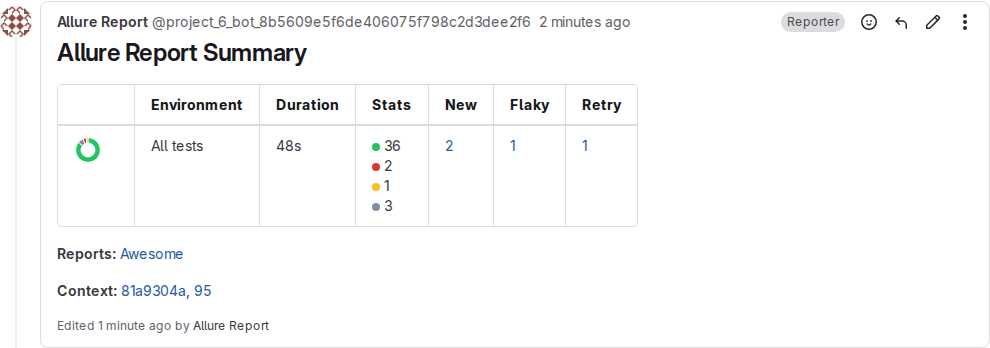
The comment is titled Allure Report Summary. It contains a table with the duration of the run, the number of tests with each status, and the numbers of new, flaky and retried tests, which link to the report filtered by these tests. Below the table, there are links to the report, the commit and the pipeline. The comment doesn't include the results of the quality gate.
If the configuration file has several report plugins, for example, awesome and dashboard, each report is generated in its own subdirectory of the report directory, and the comment links to each of them.
Each job posts its own comment, and later pipelines of the merge request update it instead of posting a new one. The comment is posted on behalf of the token's user, which is a bot user for a project access token.
Without a token, the command prints no API token provided, skipping instead. In branch pipelines, it prints failed to add summary comment: missing merge request, which you can ignore. To turn the comment off, use --no-summary-comment.
Merge requests from forks
By default, the pipeline of a merge request from a fork runs in the fork, so it can't comment on the merge request in your project: the command prints failed to add summary comment: cross-project merge request. To get the comment, run the pipeline in your project.
Combine results of parallel jobs
When tests run in several jobs, for example, with parallel, generate one report in a job of a later stage. To pass the results to it, run the tests with allure run --dump and pass the archives to allure gitlab with --dump:
stages: [test, report]

default:
  image: node:22

test:
  stage: test
  parallel: 2
  script:
    - npm ci
    - npx allure run --dump=dump-$CI_NODE_INDEX -- npx vitest run --shard=$CI_NODE_INDEX/$CI_NODE_TOTAL
  artifacts:
    when: always
    paths:
      - dump-*.zip

report:
  stage: report
  when: always
  script:
    - npm ci
    - npx allure gitlab --dump "dump-*.zip"
  artifacts:
    when: always
    paths:
      - allure-report
      - history.jsonl
when: always makes the report job run even when some of the test jobs fail.
Alternatively, save the allure-results directory as an artifact of the test jobs. GitLab extracts the artifacts of all the test jobs into the same directory of the report job, so npx allure gitlab ./allure-results reads the results of all of them.
Publish the report to Allure Report Storage
If Allure Report Storage is configured in the allureService section of the configuration file, allure gitlab publishes the report there, and the comment links to the published report instead of the job artifacts.
The history then comes from the storage service, so the command doesn't download or write the history file, and you don't need to save it as an artifact. For the history of merge request pipelines, see History depth and branches.
Command options
npx allure gitlab [options] [<results directories>...]The command reads the results from the directories that match the given paths or patterns. Without them, it uses resultsDir from the configuration file, or all allure-results directories in the current directory and its subdirectories.
| Option | Description |
|---|---|
--config, -c | The path to the configuration file. |
--output, -o | The report directory. Default: allure-report. An absolute path must be inside the project directory (CI_PROJECT_DIR). |
--report-name, --name | The report name. Default: name from the configuration file, or Allure Report. |
--history-path | The history file. Default: history.jsonl. |
--history-limit | The maximum number of history entries to keep. Default: 100. |
--history-base-url | The public address of the report directory, if you publish it yourself. The report links in the comment and in the history then point there. Default: the address of the report in the job artifacts. |
--dump | The path or pattern of archives created by allure run --dump. Can be specified multiple times. |
--summary-comment, --no-summary-comment | Whether to post the summary comment in merge request pipelines. Default: on. |
--gitlab-token | The token for downloading the history and posting the comment. Default: the value of the GITLAB_TOKEN environment variable. |
The report directory, the history file, the history limit and the public address of the report can only be set with these options: allure gitlab ignores the output, historyPath, historyLimit and historyBaseUrl options of the configuration file. The other options of the configuration file, such as plugins and qualityGate, apply as usual.