Skip to content
Allure report logoAllure Report
Main Navigation ModulesDocumentationStarter Project

English

Español

English

Español

Appearance

Sidebar Navigation

Allure 3: Getting Started

Install & Upgrade

Install for Node.js

Upgrade Allure

Working With Reports

How to generate a report

How to view a report

Improving readability of your test reports

Improving navigation in your test report

Allure 2: Getting Started

Install & Upgrade

Install for Windows

Install for macOS

Install for Linux

Install for Node.js

Upgrade Allure

Working With Reports

How to generate a report

How to view a report

Improving readability of your test reports

Improving navigation in your test report

Features

Test steps

Attachments

Test statuses

Sorting and filtering

Defect categories

Visual analytics

Test stability analysis

History and retries

Timeline

Export to CSV

Export metrics

Guides

JUnit 5 parametrization

JUnit 5 & Selenide: screenshots and attachments

JUnit 5 & Selenium: screenshots and attachments

Setting up JUnit 5 with GitHub Actions

Pytest parameterization

Pytest & Selenium: screenshots and attachments

Pytest & Playwright: screenshots and attachments

Pytest & Playwright: videos

Playwright parameterization

Publishing Reports to GitHub Pages

Allure Report 3: XCResults Reader

How it works

Overview

Test result file

Container file

Categories file

Environment file

Executor file

History files

Integrations

Azure DevOps

Bamboo

GitHub Action

Jenkins

JetBrains IDEs

TeamCity

Visual Studio Code

Frameworks

Behat

Getting started

Configuration

Reference

Behave

Getting started

Configuration

Reference

Codeception

Getting started

Configuration

Reference

CodeceptJS

Getting started

Configuration

Reference

Cucumber.js

Getting started

Configuration

Reference

Cucumber-JVM

Getting started

Configuration

Reference

Cucumber.rb

Getting started

Configuration

Reference

Cypress

Getting started

Configuration

Reference

Jasmine

Getting started

Configuration

Reference

JBehave

Getting started

Configuration

Reference

Jest

Getting started

Configuration

Reference

JUnit 4

Getting started

Configuration

Reference

JUnit 5

Getting started

Configuration

Reference

Mocha

Getting started

Configuration

Reference

Newman

Getting started

Configuration

Reference

NUnit

Getting started

Configuration

Reference

PHPUnit

Getting started

Configuration

Reference

Playwright

Getting started

Configuration

Reference

pytest

Getting started

Configuration

Reference

Pytest-BDD

Getting started

Configuration

Reference

Reqnroll

Getting started

Configuration

Reference

REST Assured

Getting started

Configuration

Robot Framework

Getting started

Configuration

Reference

RSpec

Getting started

Configuration

Reference

SpecFlow

Getting started

Configuration

Reference

Spock

Getting started

Configuration

Reference

TestNG

Getting started

Configuration

Reference

Vitest

Getting started

Configuration

Reference

WebdriverIO

Getting started

Configuration

Reference

xUnit.net

Getting started

Configuration

Reference

On this page

Allure GitHub Action Allure 3 ​

Allure Report 3 comes with support for the Allure GitHub Action.

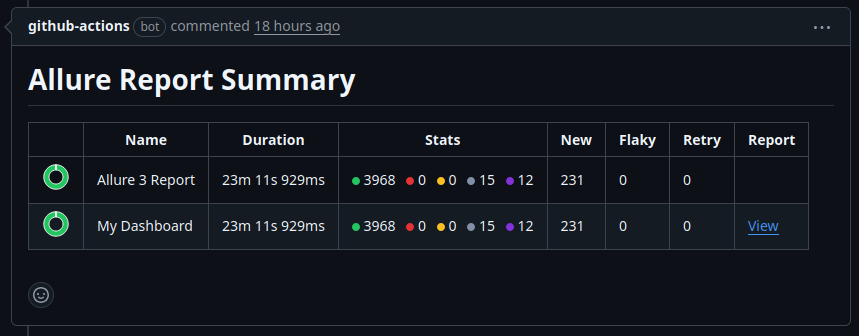
With this action you can automatically post test run summaries as pull request comments in your GitHub repository. The summaries contain:

  • A visual summary table of the run and generated reports
  • Test run duration
  • Amount of new, flaky and retried tests in the run
  • Full report link, if it was published to Allure Service
  • Detailed lists of new, flaky or retried tests

Additionally, if your allure configuration includes quality gate settings, you get a pass/fail Quality Gate GitHub Check on your pull requests.

Prerequisites ​

Allure Report Generation Workflow ​

To work properly, this GitHub Action requires that your workflow use Allure 3 and relevant Allure integrations depending on your framework to generate an HTML Allure Report.

HTML reports produce the {report-directory}/summary.json file which the action reads, turns into a readable summary table, and posts as a pull request comment.

TIP

The action will not fully work if you're generating CSV reports, as the CSV plugin doesn't create a summary.json file. It may also not work with third party HTML report plugins, if they don't create a summary.json.

GitHub Permissions ​

Add pull-requests and checks permissions to your workflow to enable comments and checks for pull requests in your repository:

yaml
permissions:
  pull-requests: write
  checks: write

Configuration ​

Add the action to your workflow right after the step at which you produce the Allure Report:

yaml
- name: Run tests
  run |-
    # run your tests that generate Allure Report data

- name: Run Allure Action
  uses: allure-framework/allure-report@v0
  with:
    # Path to the generated report directory
    # By default, it's set to `./allure-report`
    report-directory: "./allure-report"
    # GitHub Token that's used for posting the comments in Pull Requests
    github-token: ${{ secrets.GITHUB_TOKEN }}

Minimal Working Example ​

yaml
name: Tests with Allure Report

on:
  pull_request:
    branches: [main]

permissions:
  pull-requests: write
  checks: write

jobs:
  test:
    runs-on: ubuntu-latest

    steps:
      # 1. Checkout code
      - name: Checkout
        uses: actions/checkout@v4

      # 2. Setup your language/runtime
      - name: Setup Node.js
        uses: actions/setup-node@v4
        with:
          node-version: "20"

      # 3. Install dependencies
      - name: Install dependencies
        run: npm ci

      # 4. Run tests (must use Allure reporter)
      - name: Run tests and generate report
        run: npx allure run -- npm run test
        # This generates allure-results/ directory and creates allure-report/ with summary.json

      # 5. Post summary to PR
      - name: Run Allure Action
        uses: allure-framework/allure-action@v0
        with:
          report-directory: "./allure-report"
          github-token: ${{ secrets.GITHUB_TOKEN }}

Allure Report Configuration File ​

In addition to its own configuration in the workflow file, the action also uses the Allure 3 runtime configuration file (allurerc.mjs or allurerc.js).

It uses the config file's output field as a path where it should search for the generated reports. This matters for multi-report setups.

Outputs ​

Summary Table Comment ​

The action posts a comment like this:

Allure GitHub Action summary

If you have multiple reports set up in your configuration (for example one general report and one dashboard report), you'll get a separate table row for each report.

Individual Test Lists ​

If any new, flaky or retried tests are detected during the run, the action will post separate comments listing them individually.

Long lists are cut into chunks and posted as several separate comments to keep within GitHub's comment character limit.

Allure GitHub Action test list

TIP

Currently to work properly this feature requires you to track test history between workflow runs, as new and flaky status is determined based on history. Without it new and flaky test counts will always be 0.

Remote history tracking is natively supported in Allure Service.

Quality Gate Check ​

If quality gates are configured in your Allure setup, the action creates a GitHub Check:

  • ✅ Success - All quality gates passed
  • ❌ Failure - One or more quality gates failed

The check includes details about which rules failed.

To determine the outcome, the action looks for quality gate data in the {report-directory}/quality-gate.json file.

Pager
Previous pageBamboo
Next pageJenkins
Powered by

Subscribe to our newsletter

Get product news you actually need, no spam.

Subscribe
Allure TestOps
  • Overview
  • Why choose us
  • Cloud
  • Self-hosted
  • Success Stories
Company
  • Documentation
  • Blog
  • About us
  • Contact
  • Events
© 2025 Qameta Software Inc. All rights reserved.