
Quality Gate Allure 3
Quality Gate is a built-in feature of Allure Report 3 that allows you to enforce a quality standard on your project, typically when it's about to advance from one deployment stage to another. This feature fails a test run if it violates the defined set of rules, thus preventing the deployment of a project that doesn't meet the desired quality standard.
Currently, Allure Report has 4 built-in rules you can use:
| Rule name | Rule description | Rule function name | Units |
|---|---|---|---|
maxFailures | Maximum allowed number of failed tests (excludes known issues) | maxFailuresRule | Number of tests |
minTestsCount | Minimum required number of executed tests | minTestsCountRule | Number of tests |
successRate | Minimum required success rate for tests (excludes known issues) | successRateRule | Ratio (0.0 to 1.0) |
maxDuration | Maximum allowed duration for any single test | maxDurationRule | Milliseconds |
You can also use third-party rules and write entirely custom rules yourself.
Basic Configuration
Built-in Rules
As other advanced features, you can configure Quality Gate in the runtime configuration file.
Depending on format, add these lines to it:
import { defineConfig } from "allure";

export default defineConfig({
  qualityGate: {
    rules: [
      {
        <rule-name>: <expected-value>,
      },
    ],
 },
}){
"qualityGate": {
"rules": [
{
"<rule-name>": "<expected-value>"
}
]
}
}qualityGate:
rules:
- <rule-name>: <expected-value>What config format to use?
Generally, if you use only the built-in rules without any additional logic applied, you can stick to static .json or .yaml config files. If you want to customize anything, apply additional filters to analyzed test results, or use any custom rules, you need the dynamic .mjs or .js config, as you'll be adding executable code to it.
For example:
import { defineConfig } from "allure";

export default defineConfig({
  qualityGate: {
    rules: [
      {
        maxFailures: 5,
        minTestsCount: 30,
        // executable code that validates only test results with critical severity label
        filter: (tr) =>
          tr.labels.some((label) => label.name === "severity" && label.value === "critical"),
      },
    ],
  },
});
If either of the maxFailures and minTestsCount rules you configured here fail, your run will complete with exit code 1, Quality Gate will print a message reporting what rule failed to the console, and you’ll see the exit code in the HTML report generated from the test run.
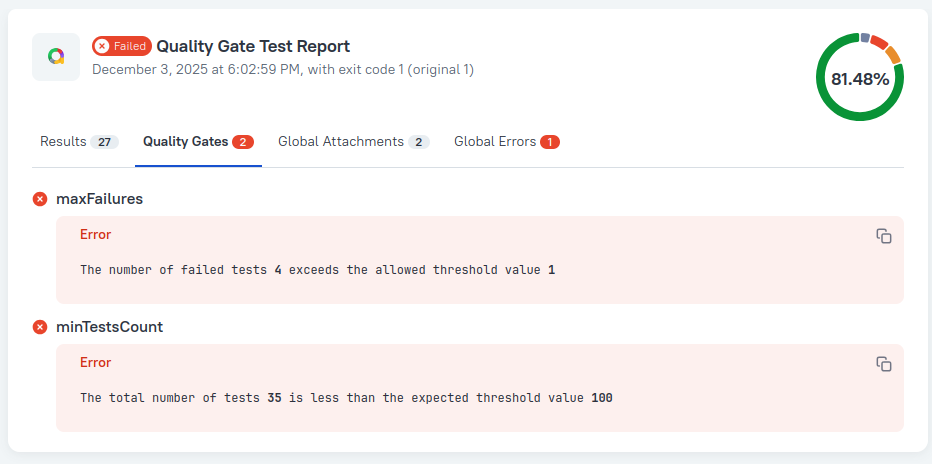
If no Quality Gate rules fail, the exit code will be 0, and the report status is passed.
Fast Fail
If you want to terminate the test run immediately when at least one Quality Gate rule fails – add the fastFail property to the rule set:
import { defineConfig } from "allure";

export default defineConfig({
  qualityGate: {
    rules: [
      {
        maxFailures: 5,
        fastFail: true,
      },
    ],
  },
});
Not all rules make sense with fastFail. We do not recommend enabling fastFail in rulesets including rules like minTestsCount and successRate, because the values they check can only be calculated correctly after all test results are received, i.e., after the test run is already over. If you want to use these rules, we recommend moving them into a new rule set (see below) with fastFail set to false.
Multiple Rule Sets
You can also define multiple Quality Gate rule sets. This can be useful when you want to separate fast-failing rules from all others:
import { defineConfig } from "allure";

export default defineConfig({
  qualityGate: {
    rules: [
      {
        // use id field to make ruleset's rules easier to identify
        id: "fast-failing ruleset",
        maxFailures: 5,
        fastFail: true,
      },
      {
        id: "non-fast-failing ruleset",
        successRate: 0.95,
      },
    ],
  },
});
Run Allure with Quality Gates Enabled
There are three Allure CLI commands that apply quality gates:
allure run- applies the quality gates marked withfastFailas the test run proceeds and checks if it should be terminated early; once the test run finishes, it applies all of the quality gates to the final test results.allure quality-gate- applies the quality gates against all test results from all matched directories. Doesn't generate reports.
allure run always uses the rules specified in the configuration file.
Compatibility with other features
- At this time Quality Gate is not compatible with retries.
allure run --rerun 3 -- <test command>will not work, if you have quality gate enabled in your Allure 3 configuration. - Quality gate is, however, integrated with global errors. If a quality gate rule fails, it's logged as a global error.
allure quality-gate uses the configuration by default, but also allows defining the rules via the CLI by using these options:
--max-failures--min-tests-count--success-rate
For example:
allure quality-gate --max-failures 5If any of these are used, the configuration file is ignored and the rules from the CLI command are used instead.
Advanced Configuration
The features in this section require dynamic config files (.mjs/.js) that can execute JavaScript code.
Custom Filters
You can apply custom filtering logic to the test results Quality Gate analyzes.
The second ruleset in the example below validates only test results with critical severity label: if any such test fails, the entire run fails immediately, because fastFail is set to true for this ruleset.
import { defineConfig } from "allure";

export default defineConfig({
  qualityGate: {
    rules: [
      // first ruleset allows to have up to 10 failed tests in total, it won't fail in runtime and will report validation result in the end
      {
        id: "first-set",
        maxFailures: 10,
      },
      // second ruleset fails immediately if there is at least one critical test failure
      {
        id: "second-set",
        maxFailures: 0,
        fastFail: true,
        // validate only test results with critical severity label
        filter: (tr) =>
          tr.labels.some((label) => label.name === "severity" && label.value === "critical"),
      },
    ],
  },
});
use Field
The use array in the Allure 3 config is a list of rule implementations, where each implementation is an object defining how a specific rule works.
The default list includes the implementations of all the built-in rules, so if you're only using them, like in the examples from the Basic Configuration section, you can omit it.
But whenever you need to introduce a custom rule or tweak an existing one, you must provide your own list, and this list must include the implementations of all rules mentioned in your rule sets - both default and custom.
You should import built-in rule implementations from @allurereport/core, and custom rule implementations from whichever packages or files contain them:
import { maxFailuresRule } from "@allurereport/core";
import { defineConfig } from "allure";
import { ruleImplementation1, ruleImplementation2 } from "custom-rules";

export default defineConfig({
  qualityGate: {
    rules: [
      {
        maxFailures: 5,
        rule1: 1,
        rule2: 2,
      },
    ],
    use: [
      maxFailuresRule, // implements maxFailures, which is built-in, but you still have to list it, because you're also using custom rules
      ruleImplementation1, // implements custom rule1
      ruleImplementation2, // implements custom rule2
    ],
  },
});
Customize a Rule Message
If a rule fails, Allure prints a message to the console. You can customize this message to your liking by redefining the message function in the use array of the Quality Gate settings.
import { maxFailuresRule } from "@allurereport/core";
import { defineConfig } from "allure";

export default defineConfig({
  qualityGate: {
    rules: [
      {
        maxFailures: 5,
      },
    ],
    use: [
      {
        // don't forget to use rest spread operator to keep the rule's other fields intact
        ...maxFailuresRule,
        message: ({ expected, actual }) => `Custom message: expected ${expected}, got ${actual}`,
      },
    ],
  },
});
Use External Rules
You can use third-party Quality Gate rules:
- install the package with the rule to your project
- import the rules from the package
- provide them to the
usefield in the quality gate configuration:
import { defineConfig } from "allure";
import { rule1, rule2 } from "custom-rules-package";

export default defineConfig({
  qualityGate: {
    rules: [
      // define rulesets according the external rules signature
    ],
    use: [rule1, rule2],
  },
});
TIP
If you want to use default and external rules together, make sure to import default rules from the allure/rules package and include them in the use array as well:
import { defineConfig } from "allure";
// import default rules at once
import { qualityGateDefaultRules } from "allure/rules";
// or import them separately
import { maxDurationRule, maxFailuresRule, minTestsCountRule, successRateRule } from "allure/rules";
import { rule1, rule2 } from "custom-rules-package";

export default defineConfig({
  qualityGate: {
    rules: [
      // define rulesets according the external rules signature
    ],
    use: [...qualityGateDefaultRules, rule1, rule2],
  },
});
If you don't re-assign use field, Allure will use only the default rules automatically without additional imports.
Create Custom Rules
You can create your own quality gate rules by implementing the QualityGateRule<T,K=T> interface, where T is the type of the value that the rule is checking, and K is the type of the intermediate result that the rule is using to keep the state between the test results batches it processes.
WARNING
If you're using TypeScript, make sure to compile your custom rule file before use! Allure doesn't support on-the-fly TypeScript compilation.
This is how a built-in rule maxFailures is defined in the Allure Report's code:
import { filterUnsuccessful } from "@allurereport/core-api";
import { type QualityGateRule } from "@allurereport/plugin-api";

export const maxFailuresRule: QualityGateRule<number> = {
  rule: "maxFailures",
  message: ({ actual, expected }) =>
    `The number of failed tests ${String(actual)} exceeds the allowed threshold value ${String(expected)}`,
  validate: async ({ trs, knownIssues, expected, state }) => {
    const knownIssuesHistoryIds = knownIssues.map(({ historyId }) => historyId);
    const unknown = trs.filter(
      (tr) => !tr.historyId || !knownIssuesHistoryIds.includes(tr.historyId),
    );
    const failedTrs = unknown.filter(filterUnsuccessful);
    const actual = failedTrs.length + (state.getResult() ?? 0);

    state.setResult(actual);

    return {
      success: actual <= expected,
      actual,
    };
  },
};import { filterUnsuccessful } from "@allurereport/core-api";
export const maxFailuresRule = {
rule: "maxFailures",
message: ({ actual, expected }) =>
`The number of failed tests ${String(actual)} exceeds the allowed threshold value ${String(expected)}`,
validate: async ({ trs, knownIssues, expected, state }) => {
const knownIssuesHistoryIds = knownIssues.map(({ historyId }) => historyId);
const unknown = trs.filter(
(tr) => !tr.historyId || !knownIssuesHistoryIds.includes(tr.historyId),
);
const failedTrs = unknown.filter(filterUnsuccessful);
const actual = failedTrs.length + (state.getResult() ?? 0);
state.setResult(actual);
return {
success: actual <= expected,
actual,
};
},
};The rule object contains the following fields:
rule – the rule name which is used to identify the rule in the configuration file; it is also used in the validation error message printed to the console if the rule fails
message – function that formats the validation error message; can be redefined in the configuration file:
- takes an object with the following fields:
actual: the actual value calculated by the validate function.expected: the expected value configured in the rule set.
- must return a string to display.
validate – validation function that implements the validation logic:
takes an object with the following fields:
trs: an array of test results. These can be all test results produced in the run or just a portion of it, i.e., a batch.knownIssues: an array of known issue objects. Each object has thehistoryIdfield. Usually, you want the rule to ignore test results with historyId matching one of the known issues.expected: the expected value of type T configured in the rule set.state: an object that keeps the state across multiple validate calls against different test result batches. See an example below.
must return a promise that resolves to an object with the following fields:
success: the validation result (true or false).actual: the calculated value that the rule has checked.
To create a custom rule, define an object with the structure described above.
state and Fast Fail Logic
Allure Report applies the quality gate rules in two different ways:
when the test run completes without triggering fast fail, and all test results are ready: Allure simply applies all quality gate rules to the whole set of results.
while the test run is in progress: Allure receives batches of test results from the test framework as it progresses over the tests and checks them against quality gate rules from
fastFailsets. If a rule from afastFailset is violated, Allure terminates the test run and adds diagnostic data to the report.
Some rules work the same way in both contexts. For example, you can define a rule which checks that all blockers pass: such a rule assesses test results one-by-one and is well-defined against any subset of the test results.
Other rules, on the other hand, rely on some state that should persist across test result batches. The built-in maxFailures rule shown above is a good example: with fastFail enabled it must count failed tests as they appear for the whole duration of the run.
Such rules must use the state object that is passed to the validate function:
import type { QualityGateRule } from "allure/rules";

export const myRule: QualityGateRule<number> = {
  rule: "myRule",
  message: ({ expected, actual }) =>
    `The custom rule has failed. Expected: ${expected} doesn't equal to ${actual}`,
  validate: async ({ trs, expected, state }) => {
    // there is no initial value in the state, so we use 0 as a fallback
    const previous = state.getResult() ?? 0;
    const actual = previous + trs.length;

    state.setResult(actual);

    return {
      success: actual === expected,
      actual,
    };
  },
};
Import and Enable Custom Rule
Import the rule to the configuration file, add it to the use list, along with other rules you also want to use:
import { maxFailuresRule } from "@allurereport/core";
import { defineConfig } from "allure";
import { myRule } from "./myRule.js";

export default defineConfig({
  qualityGate: {
    rules: [
      {
        maxFailures: 5,
        myRule: 10,
      },
    ],
    use: [maxFailuresRule, myRule],
  },
});
You can generally place the code of your custom rule anywhere in your project as long as Node can successfully resolve it.
Built-in Rules Source Code
You can find it in this repository.
Use Environment Variables in Rules
If you need to pass the expected value of a rule from the outside (for example, from a workflow definition), you can use environment variables in dynamic configuration files:
import { defineConfig } from "allure";
import { myRule } from "./myRule.js";

const { MY_RULE_VALUE } = process.env;

export default defineConfig({
  name: "Allure Report 3",
  qualityGate: {
    rules: [
      {
        // use 100 as a fallback value when env variable is not set
        myRule: MY_RULE_VALUE ? Number(MY_RULE_VALUE) : 100,
      },
    ],
    use: [myRule],
  },
});jobs:
test:
runs-on: "ubuntu-latest"
steps:
# ...
- run: npx allure run -- npm test
env:
MY_RULE_VALUE: 10
# ...