Skip to content
Allure report logoAllure Report
Main Navigation ModulesDocumentationStarter Project

English

Español

English

Español

Appearance

Sidebar Navigation

Allure 3

Install & Upgrade

Install Allure

Upgrade Allure

Configure

Create Reports

How to generate a report

How to view a report

Improving readability of your test reports

Improving navigation in your test report

Reading Allure charts

Migrate from Allure 2

Allure 2

Install & Upgrade

Install for Windows

Install for macOS

Install for Linux

Install for Node.js

Upgrade Allure

Create Reports

How to generate a report

How to view a report

Improving readability of your test reports

Improving navigation in your test report

Features

Test steps

Attachments

Test statuses

Sorting and filtering

Environments

Multistage Builds

Defect categories

Visual analytics

Test stability analysis

History and retries

Quality Gate

Global Errors and Attachments

Timeline

Export to CSV

Export metrics

Guides

JUnit 5 parametrization

JUnit 5 & Selenide: screenshots and attachments

JUnit 5 & Selenium: screenshots and attachments

Setting up JUnit 5 with GitHub Actions

Pytest parameterization

Pytest & Selenium: screenshots and attachments

Pytest & Playwright: screenshots and attachments

Pytest & Playwright: videos

Playwright parameterization

Publishing Reports to GitHub Pages

Allure Report 3: XCResults Reader

How it works

Overview

Glossary

Test result file

Container file

Categories file

Environment file

Executor file

History files

Test Identifiers

Integrations

Azure DevOps

Bamboo

GitHub Action

Jenkins

JetBrains IDEs

TeamCity

Visual Studio Code

Frameworks

Behat

Getting started

Configuration

Reference

Behave

Getting started

Configuration

Reference

Codeception

Getting started

Configuration

Reference

CodeceptJS

Getting started

Configuration

Reference

Cucumber.js

Getting started

Configuration

Reference

Cucumber-JVM

Getting started

Configuration

Reference

Cucumber.rb

Getting started

Configuration

Reference

Cypress

Getting started

Configuration

Reference

Jasmine

Getting started

Configuration

Reference

JBehave

Getting started

Configuration

Reference

Jest

Getting started

Configuration

Reference

JUnit 4

Getting started

Configuration

Reference

JUnit 5

Getting started

Configuration

Reference

Mocha

Getting started

Configuration

Reference

Newman

Getting started

Configuration

Reference

NUnit

Getting started

Configuration

Reference

PHPUnit

Getting started

Configuration

Reference

Playwright

Getting started

Configuration

Reference

pytest

Getting started

Configuration

Reference

Pytest-BDD

Getting started

Configuration

Reference

Reqnroll

Getting started

Configuration

Reference

REST Assured

Getting started

Configuration

Robot Framework

Getting started

Configuration

Reference

RSpec

Getting started

Configuration

Reference

SpecFlow

Getting started

Configuration

Reference

Spock

Getting started

Configuration

Reference

TestNG

Getting started

Configuration

Reference

Vitest

Getting started

Configuration

Reference

WebdriverIO

Getting started

Configuration

Reference

xUnit.net

Getting started

Configuration

Reference

On this page

Reading Allure Charts ​

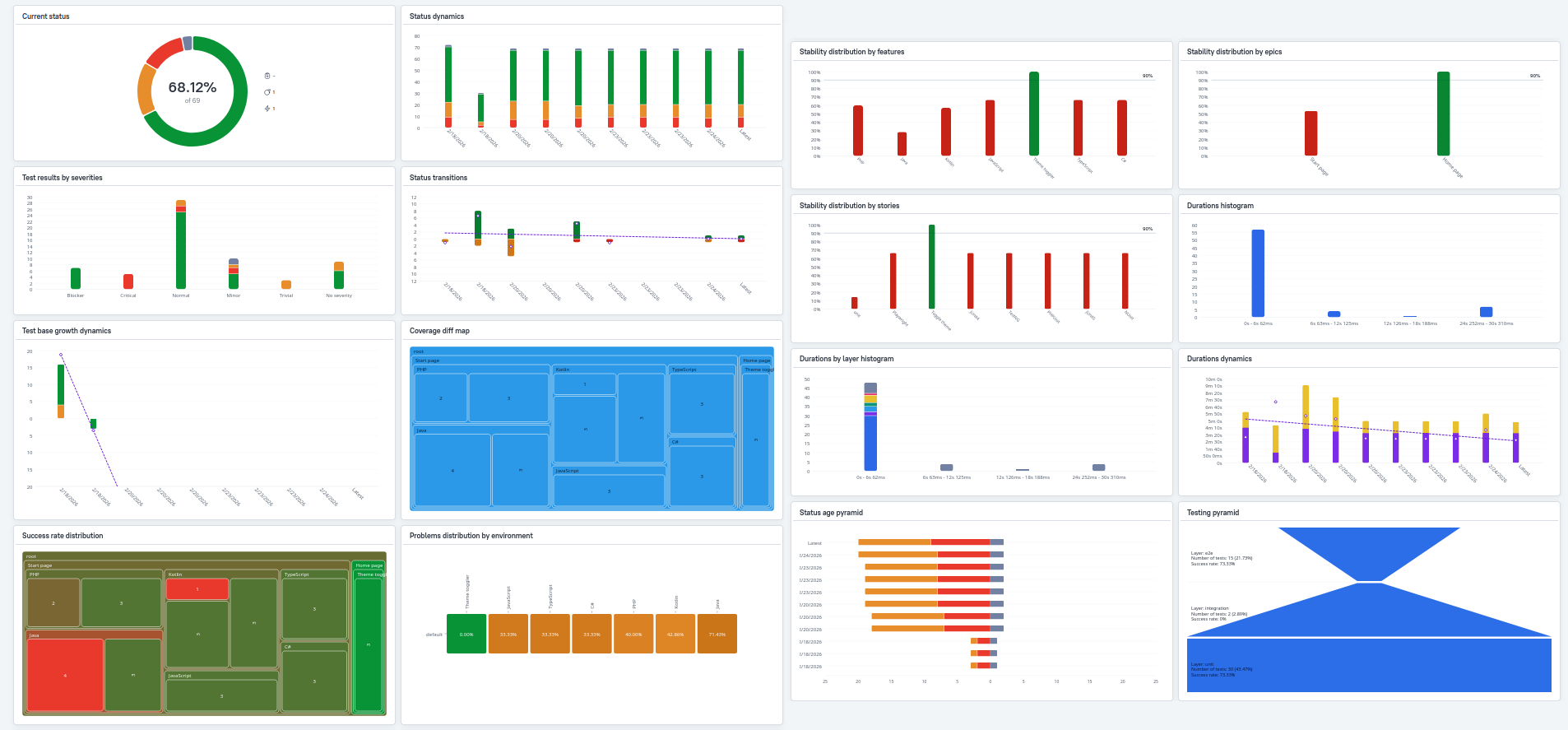
Allure Report 3 introduces many new chart types that help your team manage your project and provide different types of insights into your test suite: snapshots of current state, trends over time, project health indicators, and performance metrics.

This guide shows where to start with charts depending on what you want to track.
Insights ​

Current state — Get a snapshot of the latest run:

  • The more green on the Test statuses and Severity charts, the better.
  • The less critical the severity values for failed tests, the better: see the Severity chart.
  • Check the Testing pyramid to verify your test distribution by layer matches your expectations.

Trends — Spot patterns and changes over time:

  • Watch for upward trends in problem statuses on the Status dynamics chart.
  • Monitor Status transitions and Test base growth for unexpected spikes.

Project health — Identify risk areas and stability issues:

  • A deep and extensive Status age pyramid indicates persistent issues worth prioritizing.
  • The greener the Success rate distribution, the better.
  • Unless tests were rewritten or intentionally deleted, there shouldn't be red on the Coverage diff map.
  • Check Stability distribution charts to find problem areas.
  • Review Problems by environment to spot environment-specific and feature-specific issues.

Performance — Assess test execution efficiency:

  • The faster most tests run, the better: see Durations and Duration dynamics.
  • Watch for degradation in the speedup coefficient on Duration dynamics.

Roles ​

Different team members use Allure charts for different purposes. Here's where each role might start:

  • QA Leads rely on charts for strategic decisions: prioritizing work (Success rate distribution, Status age pyramid), planning resources (Test base growth), and managing risk (Stability distributions, Status dynamics and Status transitions).

  • Automation Engineers focus on performance and reliability: identifying optimization targets (Durations), detecting regressions (Duration dynamics), and cleaning up flaky tests (Stability distributions and Status transitions).

  • Manual Testers use charts to guide their testing efforts: finding high-risk areas (Success rate distribution), understanding what changed (Coverage diff map), and prioritizing by severity (Severity chart).

  • Stakeholders need high-level quality indicators: overall health (Status chart), quality trends (Status dynamics), and test strategy validation (Testing pyramid).

What's Next ​

Allure Report 3 charts are highly configurable. See the Visual Analytics document to learn how to customize the charts appearing in your reports.

Pager
Previous pageImproving navigation in your test report
Next pageMigrate from Allure 2
Powered by

Subscribe to our newsletter

Get product news you actually need, no spam.

Subscribe
Allure TestOps
  • Overview
  • Why choose us
  • Cloud
  • Self-hosted
  • Success Stories
Company
  • Documentation
  • Blog
  • About us
  • Contact
  • Events
© 2026 Qameta Software Inc. All rights reserved.